


Typically, for small applications, when using Apache Maven to manage project dependencies, we would create a Maven project as usual, including a pom.xml file and the application’s source code. However, for large applications like microservices, you’ll need to break them down into multiple projects for easier source code management and maintenance. Apache Maven also supports this by using a Maven multi-module project. In this tutorial, I will guide you on how to create a new Maven multi-module project and how to manage dependencies most effectively!
To create a Maven multi-module project, first, create a new Maven project:
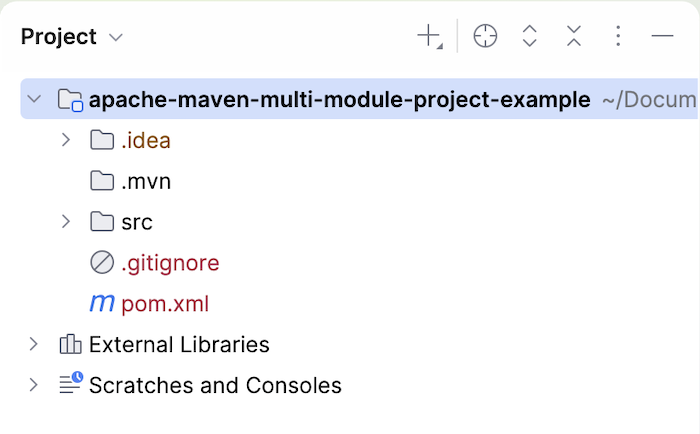
The pom.xml file in the root directory of your project will act as the Parent POM file. You need to declare the packaging type of this pom.xml file as pom.
|
1 2 3 4 5 6 7 8 9 10 11 12 13 14 |
<?xml version="1.0" encoding="UTF-8"?> <project xmlns="http://maven.apache.org/POM/4.0.0" xmlns:xsi="http://www.w3.org/2001/XMLSchema-instance" xsi:schemaLocation="http://maven.apache.org/POM/4.0.0 http://maven.apache.org/xsd/maven-4.0.0.xsd"> <modelVersion>4.0.0</modelVersion> <groupId>com.huongdanjava.apachemaven</groupId> <artifactId>apache-maven-multi-module-project-example</artifactId> <version>1.0-SNAPSHOT</version> <packaging>pom</packaging> ... </project> |
This pom.xml file will help us define properties that are shared across all modules of the project. You can use it to manage all the dependencies and plugins you want to use for the project. You can also use this file to define common configurations or Maven settings.
Now, to add a new module to the project, in IntelliJ IDE, you can right-click on the project -> select New -> select Module…:
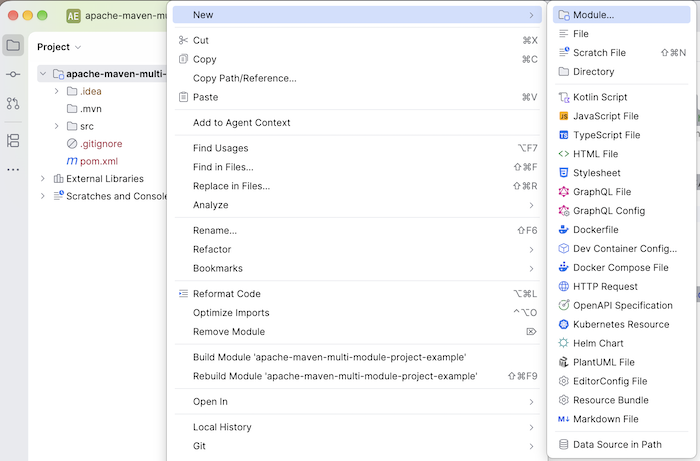
Fill in the module information according to your needs:
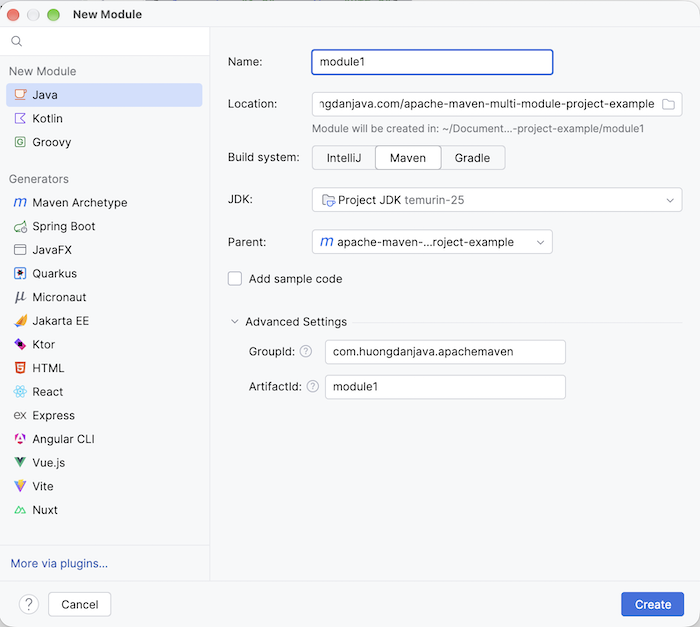
Then click the Create button, and you will see a module created inside the project’s root directory as follows:
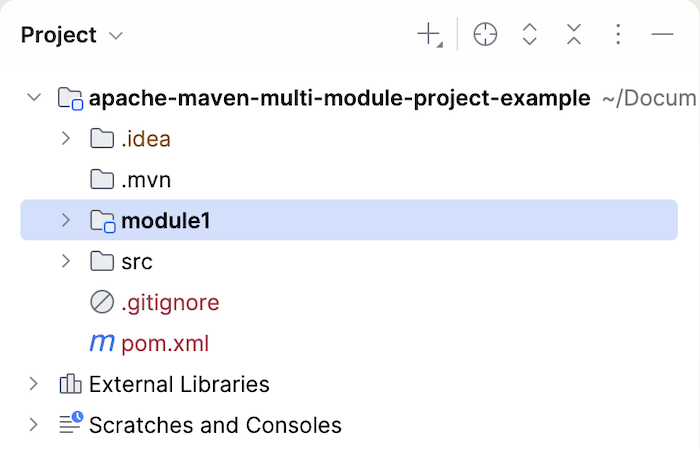
In the parent POM file, you will see that the new module we just created is declared using the <module> tag as follows:
|
1 2 3 4 5 6 7 8 9 10 11 12 13 14 15 16 17 18 |
<?xml version="1.0" encoding="UTF-8"?> <project xmlns="http://maven.apache.org/POM/4.0.0" xmlns:xsi="http://www.w3.org/2001/XMLSchema-instance" xsi:schemaLocation="http://maven.apache.org/POM/4.0.0 http://maven.apache.org/xsd/maven-4.0.0.xsd"> <modelVersion>4.0.0</modelVersion> <groupId>com.huongdanjava.apachemaven</groupId> <artifactId>apache-maven-multi-module-project-example</artifactId> <version>1.0-SNAPSHOT</version> <packaging>pom</packaging> ... <modules> <module>module1</module> </modules> </project> |
With this declaration, the pom.xml file in the project’s root directory, also known as the Aggregator POM, is responsible for grouping and coordinating the simultaneous build of modules. When building the project, Maven uses the Reactor Build mechanism to automatically analyze, arrange, and build modules in a logical order based on the dependency graph between modules.
In module1’s pom.xml file, you will see the Parent POM information declared using the Maven dependency information of the root project as follows:
|
1 2 3 4 5 6 7 8 9 10 11 12 13 14 15 16 |
<?xml version="1.0" encoding="UTF-8"?> <project xmlns="http://maven.apache.org/POM/4.0.0" xmlns:xsi="http://www.w3.org/2001/XMLSchema-instance" xsi:schemaLocation="http://maven.apache.org/POM/4.0.0 http://maven.apache.org/xsd/maven-4.0.0.xsd"> <modelVersion>4.0.0</modelVersion> <parent> <groupId>com.huongdanjava.apachemaven</groupId> <artifactId>apache-maven-multi-module-project-example</artifactId> <version>1.0-SNAPSHOT</version> </parent> <artifactId>module1</artifactId> ... </project> |
You can add module2 to your project to see the result. Mine looks like this:
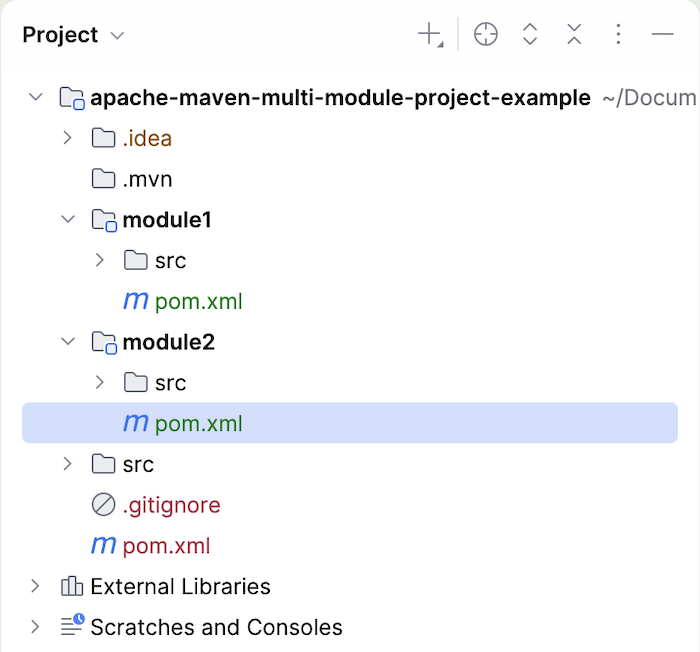
The pom.xml file in the project’s root directory will add module2 as follows:
|
1 2 3 4 5 6 7 8 9 10 11 12 13 14 15 16 17 18 19 |
<?xml version="1.0" encoding="UTF-8"?> <project xmlns="http://maven.apache.org/POM/4.0.0" xmlns:xsi="http://www.w3.org/2001/XMLSchema-instance" xsi:schemaLocation="http://maven.apache.org/POM/4.0.0 http://maven.apache.org/xsd/maven-4.0.0.xsd"> <modelVersion>4.0.0</modelVersion> <groupId>com.huongdanjava.apachemaven</groupId> <artifactId>apache-maven-multi-module-project-example</artifactId> <version>1.0-SNAPSHOT</version> <packaging>pom</packaging> ... <modules> <module>module1</module> <module>module2</module> </modules> </project> |
The value declared in the <module> tag is the name of the folder located in the project’s root directory, not the module’s artifactId.
Module dependencies
Declaring modules in the pom.xml file in the project’s root directory will not create dependencies between modules. If module1 depends on module2, you need to declare the module2 dependency in module1’s pom.xml file, for example:
|
1 2 3 4 5 6 7 8 9 10 11 12 13 14 15 16 17 18 19 |
<?xml version="1.0" encoding="UTF-8"?> <project xmlns="http://maven.apache.org/POM/4.0.0" xmlns:xsi="http://www.w3.org/2001/XMLSchema-instance" xsi:schemaLocation="http://maven.apache.org/POM/4.0.0 http://maven.apache.org/xsd/maven-4.0.0.xsd"> ... <artifactId>module1</artifactId> ... <dependencies> <dependency> <groupId>com.huongdanjava.apachemaven</groupId> <artifactId>module2</artifactId> <version>${project.version}</version> </dependency> </dependencies> </project> |
Properties configuration
When creating a new module in IntelliJ IDE, the pom.xml file of each module defines the following properties by default:
|
1 2 3 4 5 6 7 8 9 10 11 12 13 14 15 16 17 18 19 20 21 22 |
<?xml version="1.0" encoding="UTF-8"?> <project xmlns="http://maven.apache.org/POM/4.0.0" xmlns:xsi="http://www.w3.org/2001/XMLSchema-instance" xsi:schemaLocation="http://maven.apache.org/POM/4.0.0 http://maven.apache.org/xsd/maven-4.0.0.xsd"> <modelVersion>4.0.0</modelVersion> <parent> <groupId>com.huongdanjava.apachemaven</groupId> <artifactId>apache-maven-multi-module-project-example</artifactId> <version>1.0-SNAPSHOT</version> </parent> <artifactId>module1</artifactId> <properties> <maven.compiler.source>25</maven.compiler.source> <maven.compiler.target>25</maven.compiler.target> <project.build.sourceEncoding>UTF-8</project.build.sourceEncoding> </properties> ... </project> |
Since these properties are already defined in the parent POM file, you can remove them.
Properties needed for the project can be defined in the Parent POM file; modules can simply reuse them. You can declare the version information of dependencies using properties, and modules can simply reuse these properties.
Dependencies management
If the project modules use the same dependency, instead of declaring the dependency information along with its version for each module, you can declare this dependency in the parent POM file using the <dependencyManagement> tag, for example:
|
1 2 3 4 5 6 7 8 9 10 11 12 13 14 15 16 17 |
<?xml version="1.0" encoding="UTF-8"?> <project xmlns="http://maven.apache.org/POM/4.0.0" xmlns:xsi="http://www.w3.org/2001/XMLSchema-instance" xsi:schemaLocation="http://maven.apache.org/POM/4.0.0 http://maven.apache.org/xsd/maven-4.0.0.xsd"> ... <dependencyManagement> <dependencies> <dependency> <groupId>org.junit.jupiter</groupId> <artifactId>junit-jupiter</artifactId> <version>6.1.3</version> </dependency> </dependencies> </dependencyManagement> </project> |
In each module, to use that dependency, you only need to declare it without declaring the version information, as follows:
|
1 2 3 4 5 6 7 8 9 10 11 12 13 14 15 16 |
<?xml version="1.0" encoding="UTF-8"?> <project xmlns="http://maven.apache.org/POM/4.0.0" xmlns:xsi="http://www.w3.org/2001/XMLSchema-instance" xsi:schemaLocation="http://maven.apache.org/POM/4.0.0 http://maven.apache.org/xsd/maven-4.0.0.xsd"> ... <artifactId>module2</artifactId> <dependencies> <dependency> <groupId>org.junit.jupiter</groupId> <artifactId>junit-jupiter</artifactId> </dependency> </dependencies> </project> |
The <dependencyManagement> tag simply declares dependency information along with its version. The dependency is only actually added to the module’s classpath when you declare it within a module.
Plugins management
Besides declaring dependencyManagement in the Parent POM file, you can also declare plugin information and their configuration in the Parent POM file, so that modules can declare and use these plugins.
For example, if your project uses the Lombok library to automatically generate code for common code snippets, you can configure the Maven Compiler Plugin to process the Lombok-related code snippets first. In the Parent POM file, use the <pluginManagement> tag as follows:
|
1 2 3 4 5 6 7 8 9 10 11 12 13 14 15 16 17 18 19 20 21 22 23 24 25 26 27 28 29 30 31 32 33 34 35 36 37 38 39 |
<?xml version="1.0" encoding="UTF-8"?> <project xmlns="http://maven.apache.org/POM/4.0.0" xmlns:xsi="http://www.w3.org/2001/XMLSchema-instance" xsi:schemaLocation="http://maven.apache.org/POM/4.0.0 http://maven.apache.org/xsd/maven-4.0.0.xsd"> ... <dependencyManagement> <dependencies> ... <dependency> <groupId>org.projectlombok</groupId> <artifactId>lombok</artifactId> <version>1.18.48</version> </dependency> </dependencies> </dependencyManagement> <build> <pluginManagement> <plugins> <plugin> <groupId>org.apache.maven.plugins</groupId> <artifactId>maven-compiler-plugin</artifactId> <configuration> <annotationProcessorPaths> <!-- Lombok must be processed first --> <path> <groupId>org.projectlombok</groupId> <artifactId>lombok</artifactId> </path> </annotationProcessorPaths> </configuration> </plugin> </plugins> </pluginManagement> </build> </project> |
Then, simply declare the Maven Compiler Plugin in your modules:
|
1 2 3 4 5 6 7 8 9 10 11 12 13 14 15 16 17 18 19 20 |
<?xml version="1.0" encoding="UTF-8"?> <project xmlns="http://maven.apache.org/POM/4.0.0" xmlns:xsi="http://www.w3.org/2001/XMLSchema-instance" xsi:schemaLocation="http://maven.apache.org/POM/4.0.0 http://maven.apache.org/xsd/maven-4.0.0.xsd"> ... <artifactId>module1</artifactId> .. <build> <plugins> <plugin> <groupId>org.apache.maven.plugins</groupId> <artifactId>maven-compiler-plugin</artifactId> </plugin> </plugins> </build> </project> |
When compiling the code in module1, Maven will use the configuration we declared in the Parent POM file and process the Lombok-related code first.
Reactor Build
As I mentioned above, with the Reactor build mechanism, Maven will automatically analyze, organize, and build modules in a logical order. Therefore, if you build your project using the command:
|
1 |
mvn clean install |
You will see the following results:
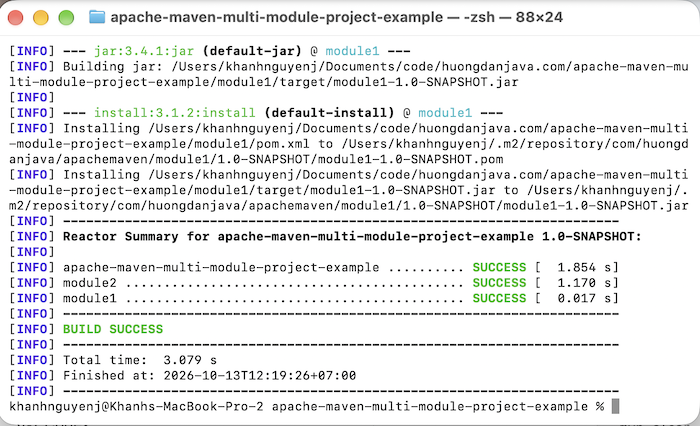
The Parent POM will be built first so that module1 and module2 can use the information declared in the Parent POM file. Next, because module1 declares a dependency on module2, as you can see, module2 is built next. And finally, module1 is built last. The module information declared in the Aggregator POM file does not determine the build order!
By default, the command:
|
1 |
mvn clean install |
This will build all modules in the project. If you only want to build one or more specific modules, you can use the command:
|
1 |
mvn clean install -pl <list>; |
or
|
1 |
mvn clean install --projects <list>; |
For example, if I only want to build module1, I would run the command:
|
1 |
mvn clean install -pl module1 |
The results are as follows:
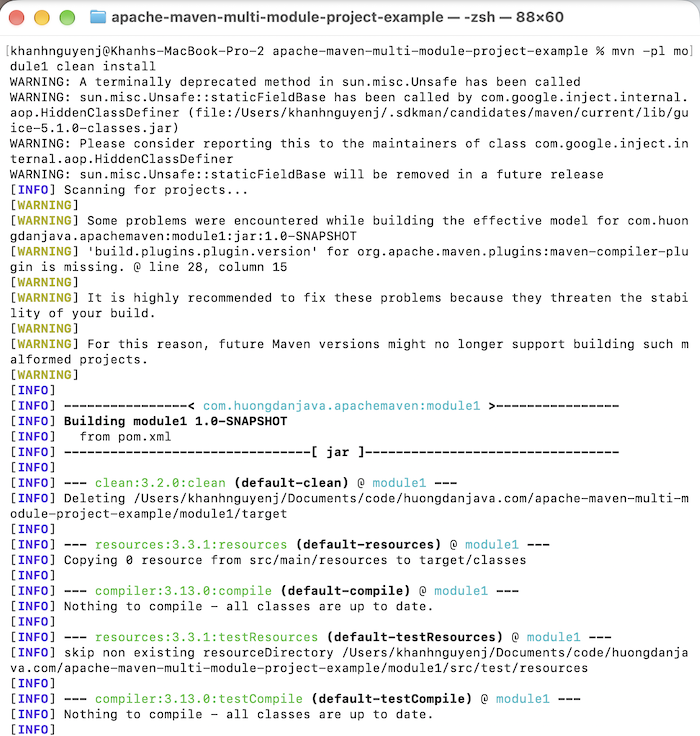
If you want to build multiple modules, you should separate them with commas!
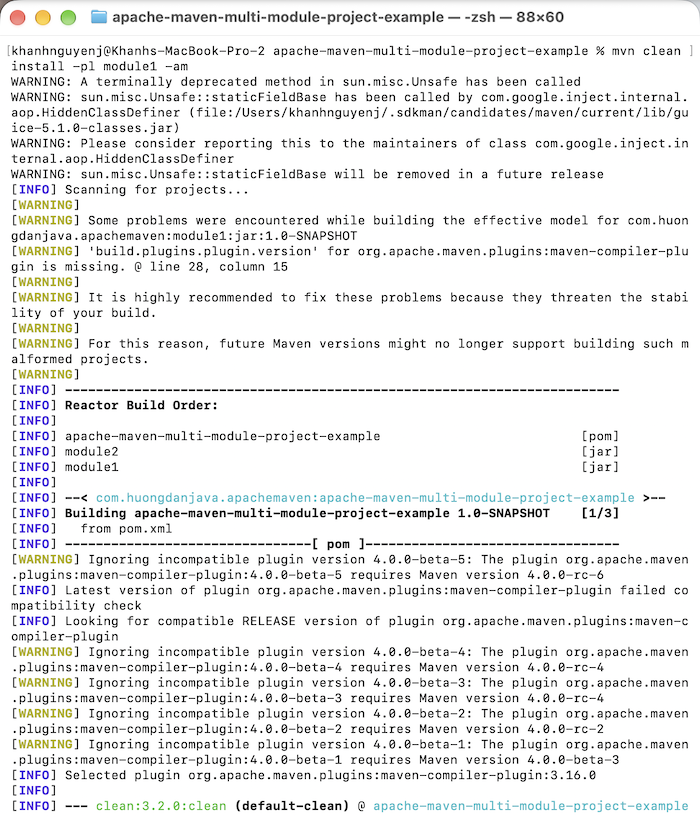
If you want to build a module along with its dependencies, you can add the -am parameter, as follows:
|
1 |
mvn clean install -pl module1 -am |
Result:
So, in this tutorial, I’ve guided you on how to create a new Maven multi-module project. Understanding and applying this correctly will help us manage our application’s source code with Maven more effectively!