When developing Java applications, we often need to store data in relational databases such as MySQL, PostgreSQL, or Oracle. Java provides JDBC so that applications can connect to and work with the database. However, as applications grow larger, using JDBC directly can lead to a lot of repetitive code, especially when we have to convert data between Java objects and records in the database.
To solve this problem, you can use JPA (Java Persistence API), currently known as the Jakarta Persistence API, with ORM (Object-Relational Mapping). JPA is a standard specification for using Java objects to work with relational databases. You can use it to map between Java objects and database records, and also use it to query and manipulate these records. How exactly does it work? In this tutorial, we will explore what JPA is, what ORM is, what role JPA plays in the Java ecosystem, and especially the differences between JPA and Hibernate!
To illustrate this tutorial, I will create a new Maven project:
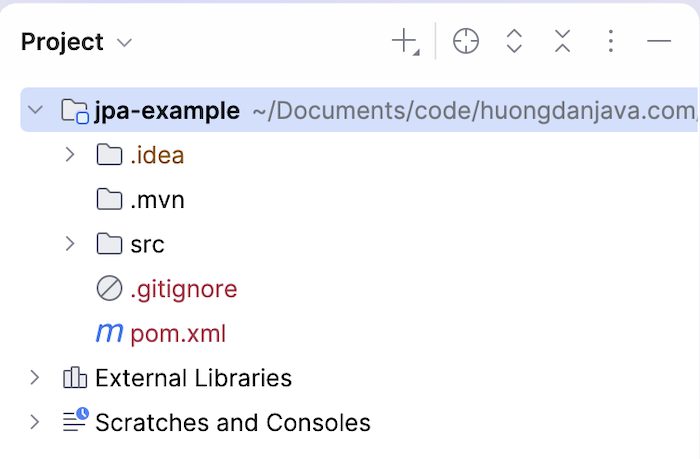
To work with JPA, you can declare the Jakarta Persistence API dependency as follows:
|
1 2 3 4 5 |
<dependency> <groupId>jakarta.persistence</groupId> <artifactId>jakarta.persistence-api</artifactId> <version>3.2.0</version> </dependency> |
The problem with storing Java Objects in a Database
Let’s say I have a Student class with the following content:
|
1 2 3 4 5 6 7 8 9 10 11 12 13 14 15 16 17 18 19 20 21 22 23 24 25 26 27 28 29 30 31 |
package com.huongdanjava.jpa; public class Student { private Long id; private String name; private String email; public Long getId() { return id; } public void setId(Long id) { this.id = id; } public String getName() { return name; } public void setName(String name) { this.name = name; } public String getEmail() { return email; } public void setEmail(String email) { this.email = email; } } |
In the database, I have a table called students with the following structure:
|
1 2 3 4 5 6 |
CREATE TABLE `students` ( `id` INT NOT NULL, `name` VARCHAR(100) NOT NULL, `email` VARCHAR(100) NOT NULL, PRIMARY KEY (`id`) ) ENGINE = InnoDB; |
I’ve also inserted some example data as follows:

In a Java application, to retrieve student information from the students table, we would work with the Student object with attributes id, name, and email. In a database, however, we would work with the students table with columns id, name, and email. This is an object-relational impedance mismatch—the difference between Java’s object-oriented model and the database’s relational model.
If using JDBC directly, we often have to manually perform several steps to convert between these two models, for example:
|
1 2 3 4 5 6 7 8 9 10 11 12 13 14 15 16 17 18 19 20 21 22 23 24 25 26 27 28 29 30 31 32 33 34 35 |
package com.huongdanjava.jpa; import java.sql.Connection; import java.sql.DriverManager; import java.sql.PreparedStatement; import java.sql.ResultSet; import java.sql.SQLException; import java.sql.Statement; public class Application { static void main(String[] args) throws SQLException { try (Connection connection = DriverManager.getConnection("jdbc:mysql://localhost:3307/example", "root", "123456")) { String sql = "SELECT id, name, email FROM students WHERE id = ?"; PreparedStatement statement = connection.prepareStatement(sql); statement.setLong(1, 1); ResultSet resultSet = statement.executeQuery(); Student student = new Student(); if (resultSet.next()) { student.setId(resultSet.getLong("id")); student.setName(resultSet.getString("name")); student.setEmail(resultSet.getString("email")); } System.out.println(student.getName()); } } } |
In a large application, this type of code mapping can appear in many places. Therefore, using JPA with ORM will make it easier for us to work with databases in those Java applications.
What is ORM?
ORM stands for Object-Relational Mapping.
It’s a technique for mapping Java objects in a Java application to data in a relational database.
For example, the ‘id’ field in the Student class can be mapped to the id column in the students table, the name field can be mapped to the name column, the email field can be mapped to the email column, etc.
ORM can help you describe this mapping using annotations instead of having to write all the mapping code yourself.
For example, you can rewrite the Student class using JPA API annotations as follows:
|
1 2 3 4 5 6 7 8 9 10 11 12 13 14 15 16 17 18 19 20 21 22 23 24 25 26 27 28 29 30 31 32 33 34 35 36 37 38 |
package com.huongdanjava.jpa; import jakarta.persistence.Entity; import jakarta.persistence.Id; import jakarta.persistence.Table; @Entity @Table(name = "students") public class Student { @Id private Long id; private String name; private String email; public Long getId() { return id; } public void setId(Long id) { this.id = id; } public String getName() { return name; } public void setName(String name) { this.name = name; } public String getEmail() { return email; } public void setEmail(String email) { this.email = email; } } |
In the example above:
Studentrepresents a persistent object.@Entitydefines that this class is an entity.@Table: If the table name in the database is different from the entity name, you need to use this annotation for mapping.idis defined as the entity’s identity via@Id.
The entity’s fields can be mapped to columns in that database.
ORMs primarily provide an abstraction so we can work with persistence in an object-oriented model.
What is JPA?
JPA stands for Java Persistence API.
JPA was the name previously used for the persistence specification in Java. Today, this specification belongs to Jakarta EE and is officially called Jakarta Persistence.
JPA is a specification, not an implementation.
This specification defines the APIs, annotations, and behaviors that a persistence provider needs to provide.
For example, JPA defines annotations such as:
@Entity@Id@Table@Column
and APIs such as:
EntityManager
However, JPA does not itself connect to and manipulate the database. That work is performed by a JPA provider.
JPA Specification and JPA Implementation
To understand JPA, you need to distinguish between two concepts: Specification and Implementation. A specification defines a contract. Implementation is the software that executes that contract.
Some popular JPA providers include:
- Hibernate
- EclipseLink
Of these, Hibernate is the implementation we most often encounter in modern Java applications.
Remember: JPA is a specification and Hibernate is an implementation of that specification.
What are the differences between JPA and Hibernate?
This is one of the most confusing points for those new to JPA.
When we write:
|
1 2 3 4 |
@Entity public class Student { ... } |
@Entity is an annotation defined by Jakarta Persistence.
Similarly:
|
1 |
@Id |
It also belongs to Jakarta Persistence.
These APIs and annotations are not unique to Hibernate.
Hibernate is an implementation capable of understanding and executing rules defined by Jakarta Persistence.
You can imagine it this way:
Application -> Jakarta Persistence API -> Hibernate (or EclipseLink or OpenJPA) -> JDBC -> Database
We can write applications based on the JPA API instead of directly relying on the Hibernate API in most cases.
Basic concepts in JPA
JPA provides several important concepts, including:
- Entity
- Persistence Context
- EntityManager
- Entity Lifecycle
- Persistence Unit
- JPA Provider
Entity
An entity is a Java object managed by the persistence mechanism and can be stored in a database.
As in the example above, Student is an entity.
Entities typically represent a data concept within an application. For example, you can define entities like this in an application:
- Student
- Course
- Employee
- Department
- Product
- Order
- Customer
Persistence Context
Persistence Context is a very important concept in JPA. Simply put, a persistence context is an environment in which entity instances are managed by a persistence provider.
For example, when you create multiple instances of the Student entity, the Persistence Context will hold information about these instances. This allows the persistence provider to monitor the state of an entity within the persistence context.
EntityManager
EntityManager is one of the most important APIs of Jakarta Persistence. It provides APIs for applications to work with entities and persistence context.
Some common operations provided by EntityManager include:
persist(): the entity will be managed and inserted into the databasefind(): search for an entity by its primary keymerge(): copy the state of an entity into a managed entityremove(): mark an entity to be deleteddetach(): remove the entity from the persistence contextrefresh(): reload the state of the entity from the database
I will go into detail about these methods later.
Entity lifecycle
An entity can go through several different states during its existence. The main states commonly mentioned are:
New: an entity is New when it has just been created and is not yet managed by a persistence context.
Managed: the entity is already managed by a persistence context.
Detached: the entity was previously managed by a persistence context but has now been removed from that context.
Removed: when the entity is marked to be removed from the database.
We can learn more about the entity lifecycle and how EntityManager affects these states in other articles.
Persistence Unit
A Persistence Unit is a collection of persistence-related configurations and entities managed together.
In traditional Jakarta Persistence applications, persistence units are typically configured through the persistence.xml file. The persistence unit defines the necessary information for the persistence environment, such as the persistence provider and database configuration.
In modern frameworks, you may not work directly with persistence.xml, but the concept of persistence units remains an important part of Jakarta Persistence.
Simple JPA example
Now, let’s convert the above example using Jakarta Persistence to see how it works!
First, you need to add the Hibernate dependency to implement Jakarta Persistence as follows:
|
1 2 3 4 5 |
<dependency> <groupId>org.hibernate.orm</groupId> <artifactId>hibernate-core</artifactId> <version>7.4.14.Final</version> </dependency> |
The hibernate-core dependency will automatically include the jakarta.persistence-api dependency, so you don’t need to declare the jakarta.persistence-api dependency separately.
You need to create a new Persistence Unit persistence.xml file in the /src/main/resources/META-INF directory to define the database and persistence provider information as follows:
|
1 2 3 4 5 6 7 8 9 10 11 12 13 14 15 16 17 |
<?xml version="1.0" encoding="UTF-8"?> <persistence xmlns="https://jakarta.ee/xml/ns/persistence" xmlns:xsi="http://www.w3.org/2001/XMLSchema-instance" xsi:schemaLocation="https://jakarta.ee/xml/ns/persistence https://jakarta.ee/xml/ns/persistence/persistence_3_2.xsd" version="3.2"> <persistence-unit name="jpaexamplePU"> <class>com.huongdanjava.jpa.Student</class> <properties> <property name="jakarta.persistence.jdbc.driver" value="com.mysql.jdbc.Driver"/> <property name="jakarta.persistence.jdbc.url" value="jdbc:mysql://localhost:3307/example"/> <property name="jakarta.persistence.jdbc.user" value="root"/> <property name="jakarta.persistence.jdbc.password" value="123456"/> </properties> </persistence-unit> </persistence> |
As you can see, we will define the entity class information and database information inside the <persistence-unit> tag.
Now, before getting the EntityManager object to work with the entities, we will initialize the EntityManagerFactory class object from this persistence.xml file as follows:
|
1 2 3 4 5 6 7 8 9 10 11 12 13 14 |
package com.huongdanjava.jpa; import jakarta.persistence.EntityManager; import jakarta.persistence.EntityManagerFactory; import jakarta.persistence.Persistence; public class Application { static void main(String[] args) { try (EntityManagerFactory emf = Persistence.createEntityManagerFactory("jpaexamplePU")) { EntityManager em = emf.createEntityManager(); } } } |
You just need to pass the Persistence Unit name to the createEntityManagerFactory() method. Jakarta Persistence with the Hibernate implementation will read the persistence.xml file to create the EntityManagerFactory for us.
After retrieving the EntityManager from EntityManagerFactory, you can retrieve the student information as follows:
|
1 2 3 4 5 6 7 8 9 10 11 12 13 14 15 16 17 18 |
package com.huongdanjava.jpa; import jakarta.persistence.EntityManager; import jakarta.persistence.EntityManagerFactory; import jakarta.persistence.Persistence; public class Application { static void main(String[] args) { try (EntityManagerFactory emf = Persistence.createEntityManagerFactory("jpaexamplePU")) { EntityManager em = emf.createEntityManager(); Student student = em.find(Student.class, 1); System.out.println(student.getName()); } } } |
The result when you run this example is as follows:
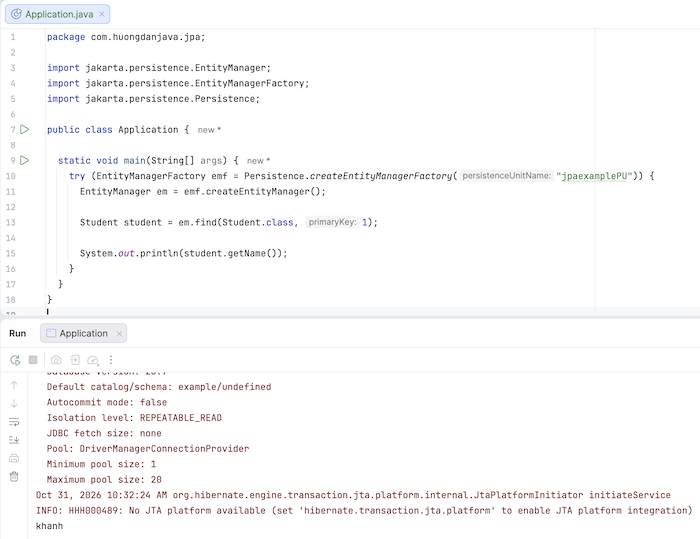
As you can see, with just a few lines of code, we can retrieve the student’s information from the database.
JPA and JDBC
JPA doesn’t replace JDBC in the sense that JDBC no longer exists. Instead, JPA is generally at a higher level of abstraction than JDBC.
Here’s a simple comparison table between JPA and JDBC:
| JDBC | JPA |
|---|---|
| API for working with the database | Specification for persistence |
| SQL-centric | Object-centric |
| Developers often handle mapping manually. | ORM supports mapping |
| Working directly with the JDBC API | Working through the persistence API |
| Not ORM | Provide ORM programming model |
With JDBC, we will often work directly with:
- Connection
- PreparedStatement
- ResultSet
Meanwhile, with JPA, we will be working with:
- Entity
- EntityManager
- Persistence Context
The JPA provider can then use JDBC to communicate with the database.
Summary
JPA is a very important part of the Java persistence ecosystem. Today, JPA is officially called Jakarta Persistence and serves as a specification for persistence in Java.
Most importantly, you need to remember:
- JPA = Specification
- Hibernate = Implementation
JPA provides an object-oriented persistence model based on an ORM, where Java objects can be mapped to data in a relational database.
This makes working with databases easier in Java applications.