In the previous tutorial, we explored two types of exception handlers in Spring for Apache Kafka Streams: DeserializationExceptionHandler and ProcessingExceptionHandler. In this tutorial, let’s learn about the remaining exception handler, ProductionExceptionHandler!
As I mentioned in the previous tutorial, ProductionExceptionHandler handles errors that occur when the application produces output messages.
For the ProductionExceptionHandler interface, Apache Kafka Streams only supports one implementation, DefaultProductionExceptionHandler, while Spring for Apache Kafka adds the RecoveringProductionExceptionHandler class!
For example, I also have a stream topology as follows:
|
1 2 3 4 5 6 7 8 9 10 11 12 13 14 15 16 17 18 19 20 21 22 23 24 25 26 |
package com.huongdanjava.springkafka; import org.apache.kafka.common.serialization.Serdes; import org.apache.kafka.streams.StreamsBuilder; import org.apache.kafka.streams.kstream.KStream; import org.apache.kafka.streams.kstream.Produced; import org.slf4j.Logger; import org.slf4j.LoggerFactory; import org.springframework.context.annotation.Bean; import org.springframework.context.annotation.Configuration; import org.springframework.kafka.support.serializer.JacksonJsonSerde; @Configuration public class UserStreamTopology { private static final Logger logger = LoggerFactory.getLogger(UserStreamTopology.class); @Bean public KStream<String, User> users(StreamsBuilder builder) { KStream<String, User> stream = builder.stream("users"); stream.to("output", Produced.with(Serdes.String(), new JacksonJsonSerde<>(User.class))); return stream; } } |
For this stream topology, after receiving a message from the users topic, we will publish a message to the output topic. This message will be serialized from an object of the User class. If the message we publish to the users topic does not follow the format of the User class, you will see an error and the application will stop as follows:
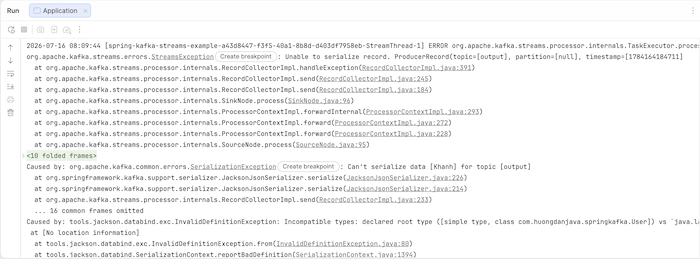
By default, Apache Kafka Stream uses the DefaultProductionExceptionHandler class to handle this PRODUCTION_EXCEPTION_HANDLER_CLASS_CONFIG configuration.
|
1 2 3 4 5 6 7 8 9 10 11 12 13 14 15 16 17 18 19 20 21 22 23 24 25 26 27 28 29 30 31 32 33 34 35 36 37 38 39 40 |
package com.huongdanjava.springkafka; import java.util.HashMap; import java.util.Map; import org.apache.kafka.common.serialization.Serdes; import org.apache.kafka.streams.StreamsConfig; import org.apache.kafka.streams.errors.DefaultProductionExceptionHandler; import org.apache.kafka.streams.errors.LogAndContinueExceptionHandler; import org.apache.kafka.streams.errors.LogAndContinueProcessingExceptionHandler; import org.springframework.context.annotation.Bean; import org.springframework.context.annotation.Configuration; import org.springframework.kafka.annotation.EnableKafkaStreams; import org.springframework.kafka.annotation.KafkaStreamsDefaultConfiguration; import org.springframework.kafka.config.KafkaStreamsConfiguration; @Configuration @EnableKafkaStreams public class AppConfig { @Bean(name = KafkaStreamsDefaultConfiguration.DEFAULT_STREAMS_CONFIG_BEAN_NAME) public KafkaStreamsConfiguration kafkaStreamsConfiguration() { Map<String, Object> props = new HashMap(); props.put(StreamsConfig.APPLICATION_ID_CONFIG, "spring-kafka-streams-example"); props.put(StreamsConfig.BOOTSTRAP_SERVERS_CONFIG, "localhost:9092"); props.put(StreamsConfig.DEFAULT_KEY_SERDE_CLASS_CONFIG, Serdes.String().getClass().getName()); props.put(StreamsConfig.DEFAULT_VALUE_SERDE_CLASS_CONFIG, Serdes.String().getClass().getName()); props.put( StreamsConfig.DESERIALIZATION_EXCEPTION_HANDLER_CLASS_CONFIG, LogAndContinueExceptionHandler.class.getName()); props.put( StreamsConfig.PROCESSING_EXCEPTION_HANDLER_CLASS_CONFIG, LogAndContinueProcessingExceptionHandler.class.getName()); props.put( StreamsConfig.PRODUCTION_EXCEPTION_HANDLER_CLASS_CONFIG, DefaultProductionExceptionHandler.class.getName()); return new KafkaStreamsConfiguration(props); } } |
And with this error, our application usually won’t recover, so it will typically stop.
If you still want the application to run, you can define a bean of the StreamsBuilderFactoryBeanConfigurer class as follows:
|
1 2 3 4 5 6 7 8 |
@Bean public StreamsBuilderFactoryBeanConfigurer streamsCustomizer() { return factoryBean -> factoryBean.setStreamsUncaughtExceptionHandler( exception -> { return StreamsUncaughtExceptionHandler.StreamThreadExceptionResponse.REPLACE_THREAD; }); } |
This configuration catches all uncaught exceptions, not only for ProductionExceptionHandler but also many other exception types, and replaces the faulty thread with a new thread so the application can continue running.
There are two other configurations related to the StreamThreadExceptionResponse class: SHUTDOWN_CLIENT and SHUTDOWN_APPLICATION. SHUTDOWN_CLIENT will stop the Kafka Stream instance that is consuming messages. We can have multiple Kafka Stream instances consuming messages; SHUTDOWN_CLIENT will stop the current Kafka Stream instance that is experiencing the error. SHUTDOWN_APPLICATION will stop the entire application.
You can see all exception handlers in the video here: