

In previous tutorial, Exception Handling in Spring for Apache Kafka Streams – Part 1 and Exception Handling in Spring for Apache Kafka Streams – Part 2, we explored different types of exception handlers in Spring for Apache Kafka and Apache Kafka Streams. For implementations like *LogAndContinue…* and *LogAndFail…*, by default, when an error occurs, our application will log the error and either continue or stop. You can also publish this error message to a dead letter queue (DLQ) topic to review the error message and reprocess it later. How exactly does this work? Let’s find out in this tutorial!
I will reuse the example from the previous tutorials.
First, let’s talk a little about DLQ topics. A DLQ topic is a topic that will store all messages published to the Apache Kafka server that our application cannot process after several retry attempts. We will need to manually review them to find a suitable solution for these faulty messages.
For implementations of the Apache Kafka Streams library for the DeserializationExceptionHandler, ProcessingExceptionHandler, and ProductionExceptionHandler interfaces, to publish faulty messages to a DLQ topic, you just need to configure the StreamsConfig.ERRORS_DEAD_LETTER_QUEUE_TOPIC_NAME_CONFIG property with the name of the DLQ topic, for example:
|
1 2 3 4 5 6 7 8 9 10 11 12 13 14 15 16 17 18 19 20 |
@Bean(name = KafkaStreamsDefaultConfiguration.DEFAULT_STREAMS_CONFIG_BEAN_NAME) public KafkaStreamsConfiguration kafkaStreamsConfiguration() { Map<String, Object> props = new HashMap(); props.put(StreamsConfig.APPLICATION_ID_CONFIG, "spring-kafka-streams-example"); props.put(StreamsConfig.BOOTSTRAP_SERVERS_CONFIG, "localhost:9092"); props.put(StreamsConfig.DEFAULT_KEY_SERDE_CLASS_CONFIG, Serdes.String().getClass().getName()); props.put(StreamsConfig.DEFAULT_VALUE_SERDE_CLASS_CONFIG, Serdes.String().getClass().getName()); props.put(StreamsConfig.ERRORS_DEAD_LETTER_QUEUE_TOPIC_NAME_CONFIG, "default-dlq-topic"); props.put( StreamsConfig.DESERIALIZATION_EXCEPTION_HANDLER_CLASS_CONFIG, LogAndContinueExceptionHandler.class.getName()); props.put( StreamsConfig.PROCESSING_EXCEPTION_HANDLER_CLASS_CONFIG, LogAndContinueProcessingExceptionHandler.class.getName()); props.put( StreamsConfig.PRODUCTION_EXCEPTION_HANDLER_CLASS_CONFIG, MyProductionExceptionHandler.class.getName()); return new KafkaStreamsConfiguration(props); } |
Here, I’m configuring the DLQ topic name to “default-dlq-topic”!
Now, let’s run the example again with the stream topology:
|
1 2 3 4 5 6 7 8 |
@Bean public KStream<String, User> users(StreamsBuilder builder) { KStream<String, User> stream = builder.stream("users"); stream.to("output", Produced.with(Serdes.String(), new JacksonJsonSerde<>(User.class))); return stream; } |
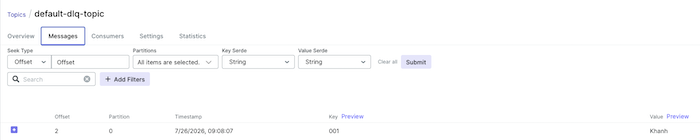
Then, publish it to the users topic with key 001 and value Khanh. You will see that our application will log errors, and the error message will be published to the DLQ topic as follows:
For Spring for Apache Kafka library implementations such as RecoveringDeserializationExceptionHandler, RecoveringProcessingExceptionHandler, and RecoveringProductionExceptionHandler, by default, these implementations always use a DLQ topic to publish error messages and recover stream topology. If the DLQ topic information is not declared, our application will log errors and stop.
There are three ways we can define the DLQ topic information for these implementations, in order of priority:
- Using the implementation of the
KafkaStreamsDeadLetterDestinationResolverfunctional interface. - Using the
StreamsConfig.ERRORS_DEAD_LETTER_QUEUE_TOPIC_NAME_CONFIGconfiguration of Apache Kafka Streams as mentioned above. - Use the
ConsumerRecordRecovererinterface implementation with the default implementationDeadLetterPublishingRecoverer.
With the KafkaStreamsDeadLetterDestinationResolver functional interface, you can resolve the DLQ topic name by using information from the ErrorHandlerContext, ConsumerRecord, and Exception objects in the parameters of the resolve() method, with a bean definition, for example:
|
1 2 3 4 5 6 7 8 9 10 11 12 13 14 15 16 17 18 |
@Bean public KafkaStreamsDeadLetterDestinationResolver resolver() { return (context, message, exception) -> { if (context.processorNodeId().equals("huongdanjava")) { return new TopicPartition("huongdanjava-dlq-topic", -1); } if (message.value() instanceof String m && m.equals("ERROR")) { return new TopicPartition("error-message-dlq-topic", -1); } if (exception instanceof NumberFormatException) { return new TopicPartition("invalid-dlq-topic", -1); } return new TopicPartition("default1-dlq-topic", 0); }; } |
After defining the resolver bean, you need to configure it for Spring for Apache Kafka’s Recovering…ExceptionHandler as follows:
|
1 2 3 4 5 6 7 8 9 10 11 12 13 14 15 16 17 18 19 20 21 22 23 24 25 |
@Bean(name = KafkaStreamsDefaultConfiguration.DEFAULT_STREAMS_CONFIG_BEAN_NAME) public KafkaStreamsConfiguration kafkaStreamsConfiguration( KafkaStreamsDeadLetterDestinationResolver resolver) { Map<String, Object> props = new HashMap(); props.put(StreamsConfig.APPLICATION_ID_CONFIG, "spring-kafka-streams-example"); props.put(StreamsConfig.BOOTSTRAP_SERVERS_CONFIG, "localhost:9092"); props.put(StreamsConfig.DEFAULT_KEY_SERDE_CLASS_CONFIG, Serdes.String().getClass().getName()); props.put(StreamsConfig.DEFAULT_VALUE_SERDE_CLASS_CONFIG, Serdes.String().getClass().getName()); props.put(StreamsConfig.ERRORS_DEAD_LETTER_QUEUE_TOPIC_NAME_CONFIG, "default-dlq-topic"); props.put( StreamsConfig.DESERIALIZATION_EXCEPTION_HANDLER_CLASS_CONFIG, RecoveringDeserializationExceptionHandler.class.getName()); props.put( StreamsConfig.PROCESSING_EXCEPTION_HANDLER_CLASS_CONFIG, RecoveringProcessingExceptionHandler.class.getName()); props.put( StreamsConfig.PRODUCTION_EXCEPTION_HANDLER_CLASS_CONFIG, RecoveringProductionExceptionHandler.class.getName()); props.put(RecoveringDeserializationExceptionHandler.DLQ_DESTINATION_RESOLVER, resolver); props.put(RecoveringProcessingExceptionHandler.DLQ_DESTINATION_RESOLVER, resolver); props.put(RecoveringProductionExceptionHandler.DLQ_DESTINATION_RESOLVER, resolver); return new KafkaStreamsConfiguration(props); } |
With the second method using the StreamsConfig.ERRORS_DEAD_LETTER_QUEUE_TOPIC_NAME_CONFIG configuration, you can define it as above or define a bean of the StreamsBuilderFactoryBeanConfigurer interface to set the value of the DLQ topic name as follows:
|
1 2 3 4 |
@Bean public StreamsBuilderFactoryBeanConfigurer streamsBuilderFactoryBeanConfigurer() { return sfb -> sfb.setDeadLetterTopicName("default2-dlq-topic"); } |
With the third method, you can define a bean for the ConsumerRecordRecoverer interface using the DeadLetterPublishingRecoverer implementation as follows:
|
1 2 3 4 5 |
@Bean public DeadLetterPublishingRecoverer recoverer(KafkaTemplate kafkaTemplate) { return new DeadLetterPublishingRecoverer( kafkaTemplate, (record, ex) -> new TopicPartition("default3-dlq-topic", 0)); } |
With this method, you need to define a bean for the KafkaTemplate class:
|
1 2 3 4 5 6 7 8 9 10 11 12 13 14 |
@Bean KafkaTemplate<byte[], byte[]> kafkaTemplate() { return new KafkaTemplate<>(producerFactory()); } @Bean public ProducerFactory<byte[], byte[]> producerFactory() { Map<String, Object> props = new HashMap<>(); props.put(ProducerConfig.BOOTSTRAP_SERVERS_CONFIG, "localhost:9092"); props.put(ProducerConfig.KEY_SERIALIZER_CLASS_CONFIG, ByteArraySerializer.class); props.put(ProducerConfig.VALUE_SERIALIZER_CLASS_CONFIG, ByteArraySerializer.class); return new DefaultKafkaProducerFactory<>(props); } |
The data type of KafkaTemplate must be <byte[], byte[]> and the serializer class must be ByteArraySerializer! This is because the raw source record will be sent to the DLQ topic.
Similarly to the resolver, for this bean recoverer, you also need to configure it for the Spring for Apache Kafka’s Recovering…ExceptionHandler as follows:
|
1 2 3 4 5 6 7 8 9 10 11 12 13 14 15 16 17 18 19 20 21 22 23 24 25 26 27 28 29 |
@Bean(name = KafkaStreamsDefaultConfiguration.DEFAULT_STREAMS_CONFIG_BEAN_NAME) public KafkaStreamsConfiguration kafkaStreamsConfiguration( KafkaStreamsDeadLetterDestinationResolver resolver, DeadLetterPublishingRecoverer recoverer) { Map<String, Object> props = new HashMap(); props.put(StreamsConfig.APPLICATION_ID_CONFIG, "spring-kafka-streams-example"); props.put(StreamsConfig.BOOTSTRAP_SERVERS_CONFIG, "localhost:9092"); props.put(StreamsConfig.DEFAULT_KEY_SERDE_CLASS_CONFIG, Serdes.String().getClass().getName()); props.put(StreamsConfig.DEFAULT_VALUE_SERDE_CLASS_CONFIG, Serdes.String().getClass().getName()); props.put(StreamsConfig.ERRORS_DEAD_LETTER_QUEUE_TOPIC_NAME_CONFIG, "default-dlq-topic"); props.put( StreamsConfig.DESERIALIZATION_EXCEPTION_HANDLER_CLASS_CONFIG, RecoveringDeserializationExceptionHandler.class.getName()); props.put( StreamsConfig.PROCESSING_EXCEPTION_HANDLER_CLASS_CONFIG, RecoveringProcessingExceptionHandler.class.getName()); props.put( StreamsConfig.PRODUCTION_EXCEPTION_HANDLER_CLASS_CONFIG, RecoveringProductionExceptionHandler.class.getName()); props.put(RecoveringDeserializationExceptionHandler.DLQ_DESTINATION_RESOLVER, resolver); props.put(RecoveringProcessingExceptionHandler.DLQ_DESTINATION_RESOLVER, resolver); props.put(RecoveringProductionExceptionHandler.DLQ_DESTINATION_RESOLVER, resolver); props.put(RecoveringDeserializationExceptionHandler.RECOVERER, recoverer); props.put(RecoveringProcessingExceptionHandler.RECOVERER, recoverer); props.put(RecoveringProductionExceptionHandler.RECOVERER, recoverer); return new KafkaStreamsConfiguration(props); } |
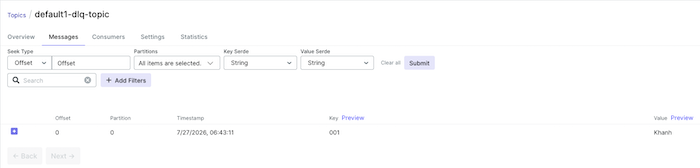
Running the example again with the 3 configurations above, you will see that our application will consume the message that was just corrupted. Because it couldn’t process it, it will publish it to the DLQ topic in the order “default1-dlq-topic”.