


To handle potential exceptions in applications using Spring for Apache Kafka Streams, you can configure the following settings:
| Configuration | Handles | Typical examples |
|---|---|---|
DESERIALIZATION_EXCEPTION_HANDLER_CLASS_CONFIG |
Consumer deserialization failures | Invalid JSON, corrupted Avro/Protobuf, wrong Serde |
PROCESSING_EXCEPTION_HANDLER_CLASS_CONFIG |
Exceptions thrown while processing records | NullPointerException, ArithmeticException, business logic exceptions in map(), join(), filter(), etc. |
PRODUCTION_EXCEPTION_HANDLER_CLASS_CONFIG |
Exceptions while producing output records | Serialization failure, broker rejecting a record, oversized record |
How exactly does that work? Let’s find out together in this tutorial!
First, I’ll create a new Maven project, similar to the example in the previous tutorial, as follows:
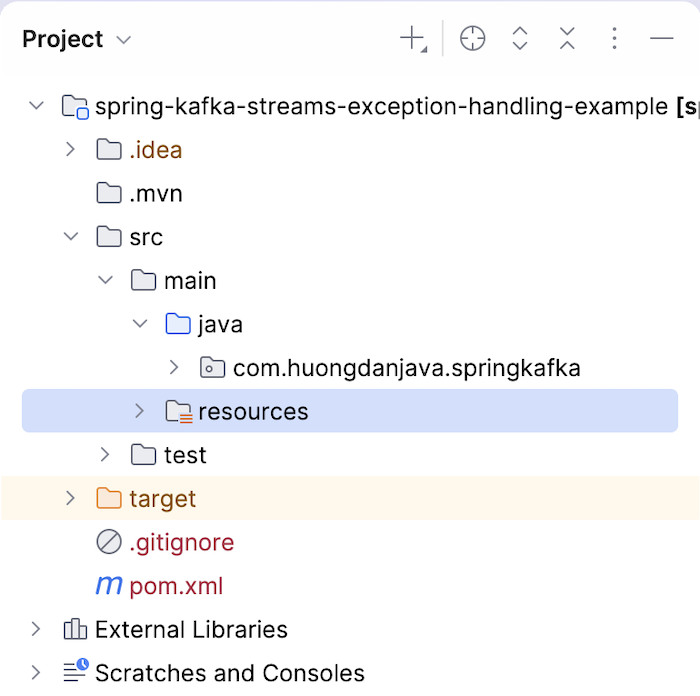
The dependencies related to Spring for Apache Kafka Streams will be declared as follows:
|
1 2 3 4 5 6 7 8 9 10 11 12 13 14 15 16 17 18 19 20 21 22 |
<dependency> <groupId>org.springframework.kafka</groupId> <artifactId>spring-kafka</artifactId> <version>4.1.0</version> </dependency> <dependency> <groupId>org.apache.kafka</groupId> <artifactId>kafka-streams</artifactId> <version>4.3.1</version> </dependency> <dependency> <groupId>org.apache.kafka</groupId> <artifactId>kafka-clients</artifactId> <version>4.3.1</version> </dependency> <dependency> <groupId>tools.jackson.core</groupId> <artifactId>jackson-databind</artifactId> </dependency> |
We need to declare dependency management for the Jackson libraries so that they are compatible with each other, as follows:
|
1 2 3 4 5 6 7 8 9 10 11 |
<dependencyManagement> <dependencies> <dependency> <groupId>tools.jackson</groupId> <artifactId>jackson-bom</artifactId> <version>3.2.1</version> <type>pom</type> <scope>import</scope> </dependency> </dependencies> </dependencyManagement> |
I also declared dependencies for the Slf4J and Logback libraries so that we can log all the errors that occur, as follows:
|
1 2 3 4 5 6 7 8 9 10 11 |
<dependency> <groupId>org.slf4j</groupId> <artifactId>slf4j-api</artifactId> <version>2.0.18</version> </dependency> <dependency> <groupId>ch.qos.logback</groupId> <artifactId>logback-classic</artifactId> <version>1.5.38</version> </dependency> |
The configuration file for the Logback library in the /src/main/resources directory will have the following content:
|
1 2 3 4 5 6 7 8 9 10 11 |
<configuration> <appender name="CONSOLE" class="ch.qos.logback.core.ConsoleAppender"> <encoder> <pattern>%d{yyyy-MM-dd HH:mm:ss} [%thread] %-5level %logger{100}.%M:%L - %msg%n</pattern> </encoder> </appender> <root level="warn"> <appender-ref ref="CONSOLE"/> </root> </configuration> |
You should also configure the Apache Kafka Server information and enable Kafka streams as follows:
|
1 2 3 4 5 6 7 8 9 10 11 12 13 14 15 16 17 18 19 20 21 22 23 24 25 26 27 28 |
package com.huongdanjava.springkafka; import java.util.HashMap; import java.util.Map; import org.apache.kafka.common.serialization.Serdes; import org.apache.kafka.streams.StreamsConfig; import org.springframework.context.annotation.Bean; import org.springframework.context.annotation.Configuration; import org.springframework.kafka.annotation.EnableKafkaStreams; import org.springframework.kafka.annotation.KafkaStreamsDefaultConfiguration; import org.springframework.kafka.config.KafkaStreamsConfiguration; @Configuration @EnableKafkaStreams public class AppConfig { @Bean(name = KafkaStreamsDefaultConfiguration.DEFAULT_STREAMS_CONFIG_BEAN_NAME) public KafkaStreamsConfiguration kafkaStreamsConfiguration() { Map<String, Object> props = new HashMap(); props.put(StreamsConfig.APPLICATION_ID_CONFIG, "spring-kafka-streams-example"); props.put(StreamsConfig.BOOTSTRAP_SERVERS_CONFIG, "localhost:9092"); props.put(StreamsConfig.DEFAULT_KEY_SERDE_CLASS_CONFIG, Serdes.String().getClass().getName()); props.put(StreamsConfig.DEFAULT_VALUE_SERDE_CLASS_CONFIG, Serdes.String().getClass().getName()); return new KafkaStreamsConfiguration(props); } } |
The first thing I need to tell you is that the values of the configurations DESERIALIZATION_EXCEPTION_HANDLER_CLASS_CONFIG, PROCESSING_EXCEPTION_HANDLER_CLASS_CONFIG, and PRODUCTION_EXCEPTION_HANDLER_CLASS_CONFIG are implementations for the interfaces DeserializationExceptionHandler, ProcessingExceptionHandler, and ProductionExceptionHandler, respectively.
DeserializationExceptionHandler
As mentioned above, the DeserializationExceptionHandler handles exceptions related to deserializing messages from the producer in our application.
For the implementation of the DeserializationExceptionHandler interface, the Apache Kafka Streams library supports two implementations by default:
LogAndContinueExceptionHandlerLogAndFailExceptionHandler
The Spring for Apache Kafka library also supports the implementation:
RecoveringDeserializationExceptionHandler
LogAndContinueExceptionHandler logs deserialization errors, ignores the faulty message, and continues processing other messages. LogAndFailExceptionHandler also logs deserialization errors but stops the application. The RecoveringDeserializationExceptionHandler implementation, instead of just logging and ignoring the faulty message, sends that message to a Dead Letter Queue (DLQ) topic so you can recover it later.
For example, I define a stream topology as follows:
|
1 2 3 4 5 6 7 8 9 10 11 12 13 14 15 16 17 18 19 20 21 22 23 24 25 26 27 28 |
package com.huongdanjava.springkafka; import org.apache.kafka.common.serialization.Serdes; import org.apache.kafka.streams.StreamsBuilder; import org.apache.kafka.streams.kstream.Consumed; import org.apache.kafka.streams.kstream.KStream; import org.slf4j.Logger; import org.slf4j.LoggerFactory; import org.springframework.context.annotation.Bean; import org.springframework.context.annotation.Configuration; import org.springframework.kafka.support.serializer.JacksonJsonSerde; @Configuration public class UserStreamTopology { private static final Logger logger = LoggerFactory.getLogger(UserStreamTopology.class); @Bean public KStream<String, User> users(StreamsBuilder builder) { KStream<String, User> stream = builder.stream("users", Consumed.with(Serdes.String(), new JacksonJsonSerde<>(User.class))); stream.peek((k, v) -> logger.info(v.toString())); return stream; } } |
This stream topology will consume topic “users” with the serialization/deserialization for the key being String and the value being the class User. The content of the class User is as follows:
|
1 2 3 |
package com.huongdanjava.springkafka; public record User(String name) {} |
Class to run the application:
|
1 2 3 4 5 6 7 8 9 10 |
package com.huongdanjava.springkafka; import org.springframework.context.annotation.AnnotationConfigApplicationContext; public class Application { static void main(){ AnnotationConfigApplicationContext context = new AnnotationConfigApplicationContext(AppConfig.class, UserStreamTopology.class); } } |
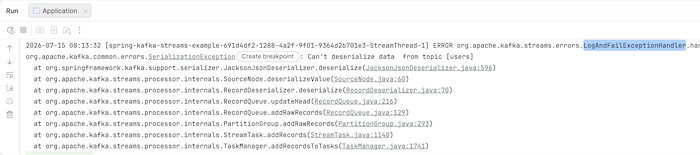
Now, if you run the application and publish a message to the users topic with key “001” and value ‘{“name”:}, you will see that our application will log the deserialization error and stop, using the deserialization class LogAndFailExceptionHandler, as follows:
If you configure an exception handler for this deserialization using the LogAndContinueExceptionHandler class:
|
1 2 3 4 5 6 7 8 9 10 11 12 13 14 15 16 17 18 19 20 21 22 23 24 25 26 27 28 29 30 31 32 |
package com.huongdanjava.springkafka; import java.util.HashMap; import java.util.Map; import org.apache.kafka.common.serialization.Serdes; import org.apache.kafka.streams.StreamsConfig; import org.apache.kafka.streams.errors.LogAndContinueExceptionHandler; import org.springframework.context.annotation.Bean; import org.springframework.context.annotation.Configuration; import org.springframework.kafka.annotation.EnableKafkaStreams; import org.springframework.kafka.annotation.KafkaStreamsDefaultConfiguration; import org.springframework.kafka.config.KafkaStreamsConfiguration; @Configuration @EnableKafkaStreams public class AppConfig { @Bean(name = KafkaStreamsDefaultConfiguration.DEFAULT_STREAMS_CONFIG_BEAN_NAME) public KafkaStreamsConfiguration kafkaStreamsConfiguration() { Map<String, Object> props = new HashMap(); props.put(StreamsConfig.APPLICATION_ID_CONFIG, "spring-kafka-streams-example"); props.put(StreamsConfig.BOOTSTRAP_SERVERS_CONFIG, "localhost:9092"); props.put(StreamsConfig.DEFAULT_KEY_SERDE_CLASS_CONFIG, Serdes.String().getClass().getName()); props.put(StreamsConfig.DEFAULT_VALUE_SERDE_CLASS_CONFIG, Serdes.String().getClass().getName()); props.put( StreamsConfig.DESERIALIZATION_EXCEPTION_HANDLER_CLASS_CONFIG, LogAndContinueExceptionHandler.class.getName()); return new KafkaStreamsConfiguration(props); } } |
and when you run the application again, you will see that the LogAndContinueExceptionHandler class will handle the error:
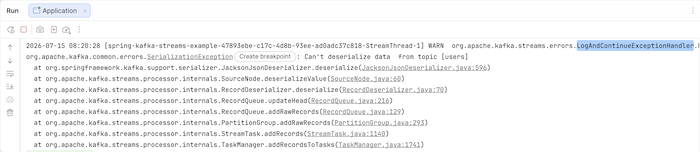
It simply logs the error, and our application will continue running, guys!
ProcessingExceptionHandler
By default, the Apache Kafka Streams library supports two implementations for the ProcessingExceptionHandler interface:
LogAndContinueProcessingExceptionHandlerLogAndFailProcessingExceptionHandler
The Spring for Apache Kafka library also supports the implementation:
RecoveringProcessingExceptionHandler
Similar to DeserializationExceptionHandler, LogAndContinueProcessingExceptionHandler will log deserialization errors, ignore the faulty message, and continue processing other messages. LogAndFailProcessingExceptionHandler will log deserialization errors but will stop the application, and RecoveringProcessingExceptionHandler will log the error and send the message to a Dead Letter Queue (DLQ) topic so you can recover it later.
For example, I have a stream topology as follows:
|
1 2 3 4 5 6 7 8 9 10 11 12 13 14 15 16 17 18 19 20 21 22 23 24 25 26 27 28 29 30 31 32 33 34 |
package com.huongdanjava.springkafka; import org.apache.kafka.streams.StreamsBuilder; import org.apache.kafka.streams.kstream.KStream; import org.slf4j.Logger; import org.slf4j.LoggerFactory; import org.springframework.context.annotation.Bean; import org.springframework.context.annotation.Configuration; @Configuration public class UserStreamTopology { private static final Logger logger = LoggerFactory.getLogger(UserStreamTopology.class); @Bean public KStream<String, String> users(StreamsBuilder builder) { KStream<String, String> stream = builder.stream("users"); stream .mapValues( value -> { logger.info("Received: {}", value); if (value.equals("ERROR")) { throw new RuntimeException("Something went wrong!"); } return value.toUpperCase(); }) .to("output"); return stream; } } |
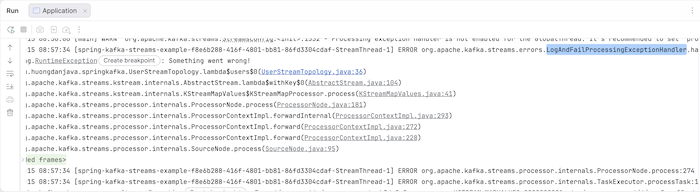
If you now run the application and publish a message with key “001” and value “ERROR”, you will see the application log the error using the LogAndFailProcessingExceptionHandler class and stop as follows:
You can change the exception handler class in this case using the PROCESSING_EXCEPTION_HANDLER_CLASS_CONFIG configuration as follows:
|
1 2 3 4 5 6 7 8 9 10 11 12 13 14 15 16 17 18 19 20 21 22 23 24 25 26 27 28 29 30 31 32 33 34 35 36 |
package com.huongdanjava.springkafka; import java.util.HashMap; import java.util.Map; import org.apache.kafka.common.serialization.Serdes; import org.apache.kafka.streams.StreamsConfig; import org.apache.kafka.streams.errors.LogAndContinueExceptionHandler; import org.apache.kafka.streams.errors.LogAndContinueProcessingExceptionHandler; import org.springframework.context.annotation.Bean; import org.springframework.context.annotation.Configuration; import org.springframework.kafka.annotation.EnableKafkaStreams; import org.springframework.kafka.annotation.KafkaStreamsDefaultConfiguration; import org.springframework.kafka.config.KafkaStreamsConfiguration; @Configuration @EnableKafkaStreams public class AppConfig { @Bean(name = KafkaStreamsDefaultConfiguration.DEFAULT_STREAMS_CONFIG_BEAN_NAME) public KafkaStreamsConfiguration kafkaStreamsConfiguration() { Map<String, Object> props = new HashMap(); props.put(StreamsConfig.APPLICATION_ID_CONFIG, "spring-kafka-streams-example"); props.put(StreamsConfig.BOOTSTRAP_SERVERS_CONFIG, "localhost:9092"); props.put(StreamsConfig.DEFAULT_KEY_SERDE_CLASS_CONFIG, Serdes.String().getClass().getName()); props.put(StreamsConfig.DEFAULT_VALUE_SERDE_CLASS_CONFIG, Serdes.String().getClass().getName()); props.put( StreamsConfig.DESERIALIZATION_EXCEPTION_HANDLER_CLASS_CONFIG, LogAndContinueExceptionHandler.class.getName()); props.put( StreamsConfig.PROCESSING_EXCEPTION_HANDLER_CLASS_CONFIG, LogAndContinueProcessingExceptionHandler.class.getName()); return new KafkaStreamsConfiguration(props); } } |
Run the example again and republish the message with the content as above. You will see that our application will still log the error, but it will no longer stop.
You can read part 2 here.
You can see all the exception handlers in the video here: