


A stream in Apache Kafka is an unlimited sequence of messages continuously sent to an Apache Kafka topic. If you use the standard Spring for Apache Kafka library, you can easily subscribe and receive these messages. However, if you want to apply more operations to the received messages, such as filtering, joining, aggregating, transforming messages, and managing state, you can use the Spring for Apache Kafka library along with the Apache Kafka Streams library. The Spring for Apache Kafka library acts as a wrapper for the Apache Kafka Streams library, allowing us to not only receive messages from Apache Kafka topics but also filter, transform, aggregate, join, etc., these messages, aiming to build scalable and fault-tolerant data processing pipelines. How exactly does this work? Let’s explore this in this tutorial!
First, let’s create a new Maven project:
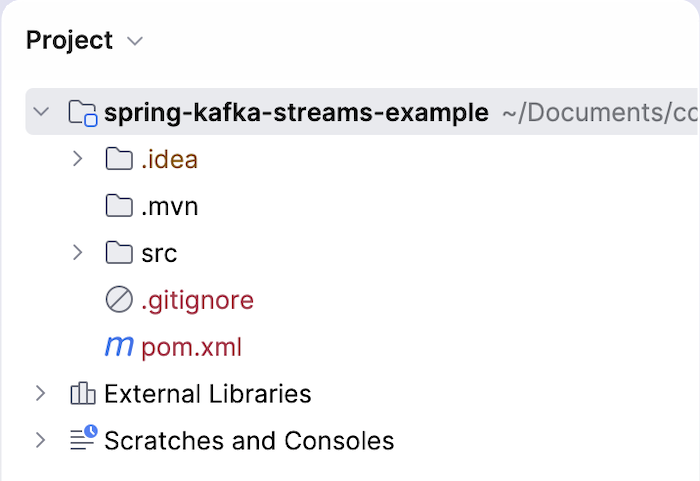
with the following Spring for Apache Kafka and Apache Kafka Streams dependencies:
|
1 2 3 4 5 6 7 8 9 10 11 |
<dependency> <groupId>org.springframework.kafka</groupId> <artifactId>spring-kafka</artifactId> <version>4.1.0</version> </dependency> <dependency> <groupId>org.apache.kafka</groupId> <artifactId>kafka-streams</artifactId> <version>4.3.0</version> </dependency> |
For example, to simplify things, we’ll have an application that receives messages from a topic called orders. The content of these messages will simply have the key as order ID and the value will be either “CREATED” or “CANCELLED”. Our application will use the Spring for Apache Kafka Streams library to filter messages with the value “CREATED” and publish them to another topic called created-order.
First, we’ll configure the Apache Kafka server information with the application and enable the configurations for Apache Kafka Streams using the @EnableKafkaStreams annotation as follows:
|
1 2 3 4 5 6 7 8 9 10 11 12 13 14 15 16 17 18 19 20 21 22 23 24 25 26 27 |
package com.huongdanjava.springkafka; import java.util.HashMap; import java.util.Map; import org.apache.kafka.common.serialization.Serdes; import org.apache.kafka.streams.StreamsConfig; import org.springframework.context.annotation.Bean; import org.springframework.context.annotation.Configuration; import org.springframework.kafka.annotation.EnableKafkaStreams; import org.springframework.kafka.annotation.KafkaStreamsDefaultConfiguration; import org.springframework.kafka.config.KafkaStreamsConfiguration; @Configuration @EnableKafkaStreams public class AppConfig { @Bean(name = KafkaStreamsDefaultConfiguration.DEFAULT_STREAMS_CONFIG_BEAN_NAME) public KafkaStreamsConfiguration kafkaStreamsConfiguration() { Map<String, Object> props = new HashMap(); props.put(StreamsConfig.APPLICATION_ID_CONFIG, "spring-kafka-streams-example"); props.put(StreamsConfig.BOOTSTRAP_SERVERS_CONFIG, "localhost:9092"); props.put(StreamsConfig.DEFAULT_KEY_SERDE_CLASS_CONFIG, Serdes.String().getClass().getName()); props.put(StreamsConfig.DEFAULT_VALUE_SERDE_CLASS_CONFIG, Serdes.String().getClass().getName()); return new KafkaStreamsConfiguration(props); } } |
The @EnableKafkaStreams annotation will automatically register beans like StreamsBuilderFactoryBean, KafkaStreams, and StreamsBuilder, which are necessary for working with structured data streams (stream topology).
We need to define a bean of the KafkaStreamsConfiguration class with the exact name defaultKafkaStreamsConfig. This bean will define the Apache Kafka server information, the application’s unique ID to identify your application from other applications consuming messages in Apache Kafka, and the configurations related to Serdes, which are for serializing/deserializing messages. We will use String to serialize/deserialize these messages.
Next, we will define a stream topology from the moment the application receives messages, filters or transforms these messages, to how it will handle the results. In this example, I will publish the results to a different Apache Kafka topic called created-orders as follows:
|
1 2 3 4 5 6 7 8 9 10 11 12 13 14 15 16 17 18 19 20 21 22 23 24 |
package com.huongdanjava.springkafka; import org.apache.kafka.streams.StreamsBuilder; import org.apache.kafka.streams.kstream.KStream; import org.springframework.context.annotation.Bean; import org.springframework.context.annotation.Configuration; @Configuration public class OrderStreamTopology { @Bean public KStream<String, String> orderStream(StreamsBuilder builder) { KStream<String, String> orders = builder.stream("orders"); KStream<String, String> createdOrders = orders .filter((key, value) -> "CREATED".equals(value)) .mapValues(value -> "PROCESSED_" + value); createdOrders.to("created-orders"); return orders; } } |
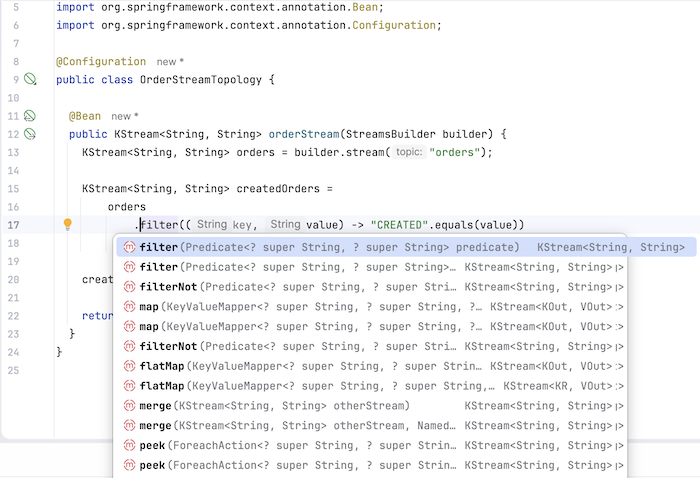
We will use an object of the StreamBuilder class to receive messages from Apache Kafka topic orders, in the form of a stream, stored in an object of the KStream class. After receiving the order-related messages, we will filter those with the value “CREATED” to publish to a topic named created-orders.
There are many other operations you can use, too!
Now, declare these configurations to Spring as follows:
|
1 2 3 4 5 6 7 8 9 10 |
package com.huongdanjava.springkafka; import org.springframework.context.annotation.AnnotationConfigApplicationContext; public class Application { static void main(){ AnnotationConfigApplicationContext context = new AnnotationConfigApplicationContext(AppConfig.class, OrderStreamTopology.class); } } |
Now, if you run the application and publish some messages to the orders topic with the following key and value:
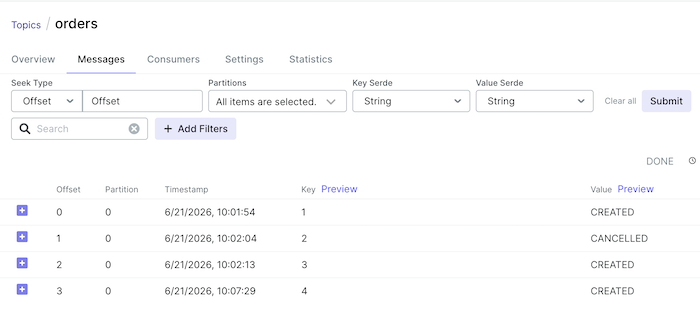
You will also see some messages published in the created-orders topic as follows:
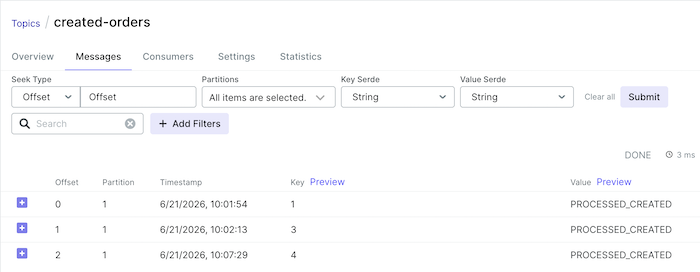
So, we’ve successfully filtered the messages published to Apache Kafka using Spring for Apache Kafka Streams!
If your application handles many messages from Apache Kafka and you want to apply more logic to process these messages, you can use the Spring for Apache Kafka Streams library.
You can watch the video here for more information.