Normally, when we need to manipulate any database we have to write SQL based on the information of the columns, the tables in the database, and possibly for different database types, the syntax of the SQL statement is different. To remove these drawbacks, you guys can use Jakarta Persistence Query Language (JPQL). How is it in detail? Let’s find out in this tutorial.
First, I will create a Maven project as an example:
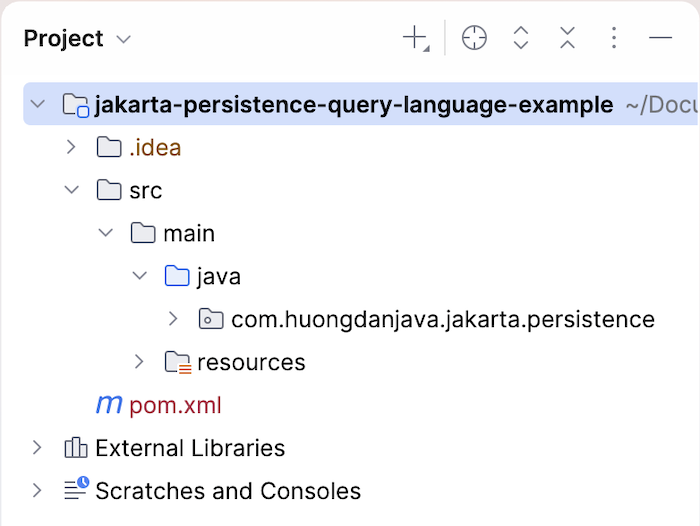
Since I’m going to use Jakarta Persistence with Hibernate’s implementation, I’ll add Hibernate dependencies like this:
|
1 2 3 4 5 |
<dependency> <groupId>org.hibernate</groupId> <artifactId>hibernate-core</artifactId> <version>7.4.14.Final</version> </dependency> |
Project Lombok:
|
1 2 3 4 5 |
<dependency> <groupId>org.projectlombok</groupId> <artifactId>lombok</artifactId> <version>1.18.48</version> </dependency> |
The first thing I need to tell you about Jakarta Persistence Query Language is that it allows us to define queries based on entities rather than the names of columns and tables in the database.
The structure and syntax of Jakarta Persistence Query Language are very similar to the structure and syntax of SQL statements. For example, for SELECT statements, the Jakarta Persistence Query Language syntax is as follows:
|
1 2 3 4 |
SELECT ... FROM ... [WHERE ...] [GROUP BY ... [HAVING ...]] [ORDER BY ...] |
or with DELETE,
|
1 |
DELETE FROM ... [WHERE ...] |
UPDATE
|
1 |
UPDATE ... SET ... [WHERE ...] |
This makes it easy to define queries using the Jakarta Persistence Query Language, but you should remember that although we define queries using entities, in practice, at runtime, Hibernate or any library that implements Jakarta Persistence will transform those query statements into SQL statements for the database with the column names and table name of the database.
Let’s say I will now use the MySQL database as an example for this tutorial. I have a table like this:
|
1 2 3 4 5 |
CREATE TABLE `clazz` ( `id` int(11) NOT NULL AUTO_INCREMENT, `name` varchar(45) NOT NULL, PRIMARY KEY (`id`) ) ENGINE=InnoDB DEFAULT CHARSET=utf8; |
Entity Clazz as follows:
|
1 2 3 4 5 6 7 8 9 10 11 12 13 14 15 16 17 18 19 20 21 22 23 |
package com.huongdanjava.jakarta.persistence; import jakarta.persistence.Column; import jakarta.persistence.Entity; import jakarta.persistence.GeneratedValue; import jakarta.persistence.GenerationType; import jakarta.persistence.Id; import jakarta.persistence.Table; import lombok.Getter; import lombok.Setter; @Entity @Table @Getter @Setter public class Clazz { @Id @GeneratedValue(strategy = GenerationType.IDENTITY) private Long id; @Column private String name; } |
To work with the MySQL database, we need to use the MySQL Driver dependency:
|
1 2 3 4 5 |
<dependency> <groupId>com.mysql</groupId> <artifactId>mysql-connector-j</artifactId> <version>26.10.0</version> </dependency> |
JPA configuration file for MySQL database:
|
1 2 3 4 5 6 7 8 9 10 11 12 13 14 15 16 17 18 19 20 |
<persistence version="3.2" xmlns="http://xmlns.jcp.org/xml/ns/persistence" xmlns:xsi="http://www.w3.org/2001/XMLSchema-instance" xsi:schemaLocation="http://xmlns.jcp.org/xml/ns/persistence http://xmlns.jcp.org/xml/ns/persistence_3_2.xsd"> <persistence-unit name="jpaexamplePU"> <class>com.huongdanjava.jakarta.persistence.Clazz</class> <properties> <property name="jakarta.persistence.jdbc.driver" value="com.mysql.cj.jdbc.Driver"/> <property name="jakarta.persistence.jdbc.url" value="jdbc:mysql://localhost:3307/example"/> <property name="jakarta.persistence.jdbc.user" value="root"/> <property name="jakarta.persistence.jdbc.password" value="123456"/> <property name="hibernate.show_sql" value="true"/> <property name="hibernate.format_sql" value="true"/> <property name="hibernate.use_sql_comments" value="true"/> </properties> </persistence-unit> </persistence> |
</persistence>
In the database, I have the following data:
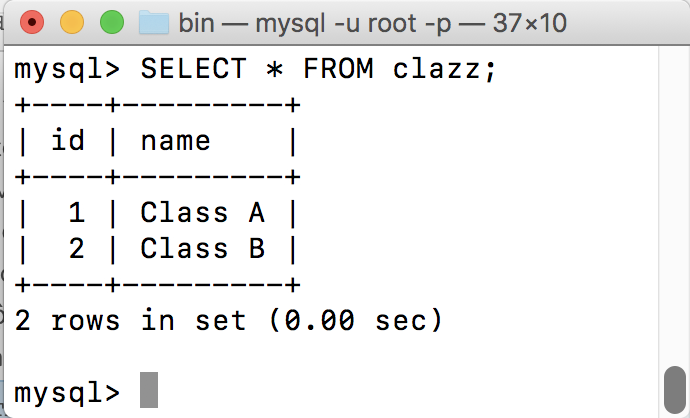
Now I will try to use Jakarta Persistence Query Language to get information from the clazz table to try to see how it is.
First, we will get the EntityManager object:
|
1 2 |
EntityManagerFactory emf = Persistence.createEntityManagerFactory("jpaexample"); EntityManager em = emf.createEntityManager(); |
Next, we will use the EntityManager object to get the Query object based on the Clazz entity’s information:
|
1 |
TypedQuery query = em.createQuery("SELECT c FROM Clazz c", Clazz.class); |
In the above code, we passed the createQuery() method a Jakarta Persistence Query Language. Do you find it like the SQL that we usually use to query the database? 😀 The only different thing is that it now uses the name of the entity of clazz table, not the name of the table clazz.
As you can see, we’ve given the entity Clazz an alias c, just like in the SQL query. This alias is called an identification variable. You can use it like a variable in Java; that is, if you want to retrieve information about the attributes of the entity Clazz, you can use “c.<attribute_name>”. For example, if you only want to retrieve the column name information in the clazz table, you can rewrite the Java Persistence Query Language query as follows:
|
1 |
SELECT c.name FROM Clazz c |
Now that you have the Query object, you can use it to get the results you want:
|
1 |
List<Clazz> resultList = query.getResultList(); |
This Query object has many methods; depending on what your Jakarta Persistence Query Language is, then use its method accordingly. Here, my Jakarta Persistence Query Language statement retrieves all records in the clazz table, so I use the getResultList() method.
After you have finished, you can print the result with the following code:
|
1 |
resultList.stream().forEach(c -> System.out.println(c.getName())); |
Result:
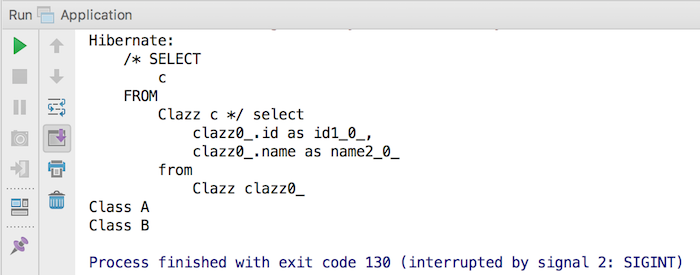
The entire code is as follows:
|
1 2 3 4 5 6 7 8 9 10 11 12 13 14 15 16 17 18 19 20 21 |
package com.huongdanjava.jakarta.persistence; import jakarta.persistence.EntityManager; import jakarta.persistence.EntityManagerFactory; import jakarta.persistence.Persistence; import jakarta.persistence.TypedQuery; import java.util.List; public class Application { public static void main(String[] args) { try (EntityManagerFactory emf = Persistence.createEntityManagerFactory("jpaexamplePU"); EntityManager em = emf.createEntityManager(); ) { TypedQuery query = em.createQuery("SELECT c FROM Clazz c", Clazz.class); List<Clazz> resultList = query.getResultList(); resultList.stream().forEach(c -> System.out.println(c.getName())); } } } |
You can also use query parameters as follows:
|
1 2 3 4 5 6 7 8 9 10 11 12 13 14 15 16 17 18 19 20 21 22 23 |
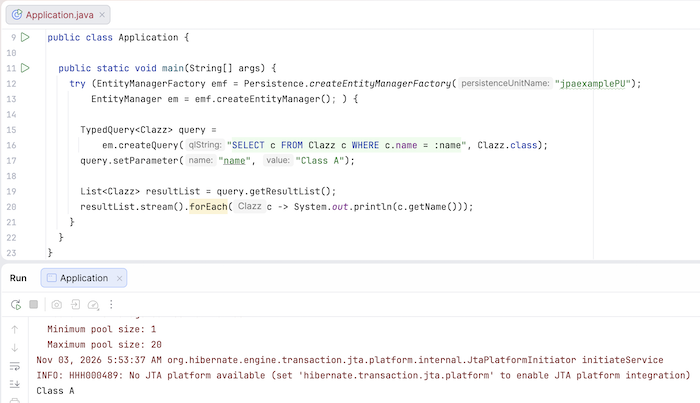
package com.huongdanjava.jakarta.persistence; import jakarta.persistence.EntityManager; import jakarta.persistence.EntityManagerFactory; import jakarta.persistence.Persistence; import jakarta.persistence.TypedQuery; import java.util.List; public class Application { public static void main(String[] args) { try (EntityManagerFactory emf = Persistence.createEntityManagerFactory("jpaexamplePU"); EntityManager em = emf.createEntityManager(); ) { TypedQuery<Clazz> query = em.createQuery("SELECT c FROM Clazz c WHERE c.name = :name", Clazz.class); query.setParameter("name", "Class A"); List<Clazz> resultList = query.getResultList(); resultList.stream().forEach(c -> System.out.println(c.getName())); } } } |
We will use a colon along with the parameter name in the query. Then, we will pass a value to this parameter using the setParameter() method of the TypedQuery object.
The result when running this example is as follows: