In Jakarta Persistence, the EntityManagerFactory object is a factory responsible for creating EntityManager instances and maintaining the persistence-unit configuration and associated persistence infrastructure. Using Spring to manage this object will help us a lot in developing Java applications that use Jakarta Persistence. In this tutorial, I will guide you on how to use Jakarta Persistence with the Spring Framework.
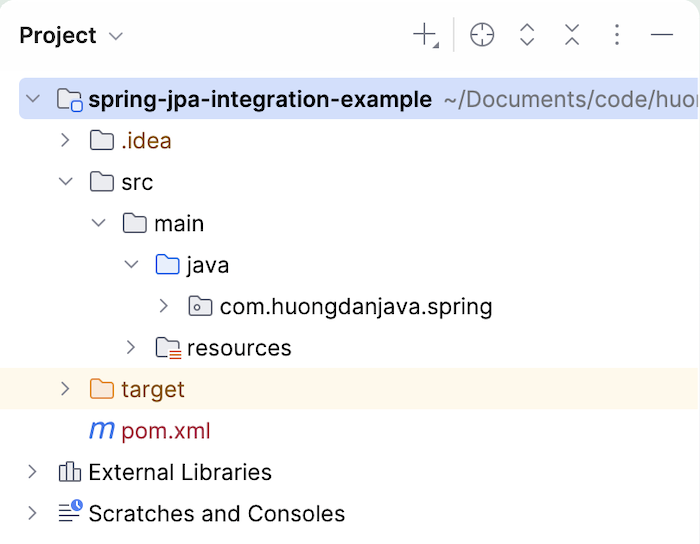
First, I will create a new Maven project as an example:
Spring framework dependency:
|
1 2 3 4 5 |
<dependency> <groupId>org.springframework</groupId> <artifactId>spring-context</artifactId> <version>7.0.10</version> </dependency> |
To work with Jakarta Persistence, we also need to add the spring-orm dependency:
|
1 2 3 4 5 |
<dependency> <groupId>org.springframework</groupId> <artifactId>spring-orm</artifactId> <version>7.0.10</version> </dependency> |
Here, I will use Jakarta Persistence with the implementation of Hibernate, so I will add the Hibernate dependency as follows:
|
1 2 3 4 5 |
<dependency> <groupId>org.hibernate</groupId> <artifactId>hibernate-core</artifactId> <version>7.4.14.Final</version> </dependency> |
MySQL Connector:
|
1 2 3 4 5 |
<dependency> <groupId>com.mysql</groupId> <artifactId>mysql-connector-j</artifactId> <version>26.10.0</version> </dependency> |
For simplicity, in this example, I only define a table containing student information with two columns:
|
1 2 3 4 5 |
CREATE TABLE `student` ( `id` bigint(20) NOT NULL AUTO_INCREMENT, `name` varchar(50) DEFAULT NULL, PRIMARY KEY (`id`) ) ENGINE=InnoDB DEFAULT CHARSET=utf8mb4; |
The entity of the Student table has the following contents:
|
1 2 3 4 5 6 7 8 9 10 11 12 13 14 15 16 17 18 19 20 21 22 23 24 25 26 27 28 29 30 31 32 33 34 35 36 37 38 39 40 41 42 |
package com.huongdanjava.spring; import jakarta.persistence.Column; import jakarta.persistence.Entity; import jakarta.persistence.GeneratedValue; import jakarta.persistence.Id; import jakarta.persistence.Table; @Table(name = "students") @Entity public class Student { @Id @GeneratedValue private Long id; @Column private String name; public Long getId() { return id; } public void setId(Long id) { this.id = id; } public String getName() { return name; } public void setName(String name) { this.name = name; } @Override public String toString() { return "Student [id=" + id + ", name=" + name + "]"; } } |
To work with Jakarta Persistence, we need a persistence.xml configuration file for it. Let’s create a new file called persistence.xml located in /src/main/resources/META-INF.
The contents of this file are as follows:
|
1 2 3 4 5 6 7 8 9 10 |
<?xml version="1.0" encoding="UTF-8" standalone="no"?> <persistence xmlns="http://xmlns.jcp.org/xml/ns/persistence" xmlns:xsi="http://www.w3.org/2001/XMLSchema-instance" xsi:schemaLocation="http://xmlns.jcp.org/xml/ns/persistence http://xmlns.jcp.org/xml/ns/persistence/persistence_3_2.xsd" version="3.2"> <persistence-unit name="springPU" transaction-type="RESOURCE_LOCAL"> <class>com.huongdanjava.spring.Student</class> </persistence-unit> </persistence> |
Now, the most important part is to declare the EntityManagerFactory object in the Spring container.
In Spring, we currently have two classes that support declaring the EntityManagerFactory object:
- LocalContainerEntityManagerFactoryBean
- LocalEntityManagerFactoryBean
With the LocalEntityManagerFactoryBean class, the Jakarta Persistence persistence.xml configuration file is usually located in the /src/main/resources/META-INF folder. With the LocalContainerEntityManagerFactoryBean class, the location of the persistence.xml file is more flexible. We can override its location, and using LocalContainerEntityManagerFactoryBean will help you be more flexible with the JDBC DataSources declaration.
I will use the LocalContainerEntityManagerFactoryBean in this example to declare it in the Spring container as follows:
|
1 2 3 4 5 6 7 |
<bean id="entityManagerFactory" class="org.springframework.orm.jpa.LocalContainerEntityManagerFactoryBean"> <property name="dataSource" ref="dataSource" /> <property name="persistenceUnitName" value="springPU" /> <property name="jpaVendorAdapter"> <bean class="org.springframework.orm.jpa.vendor.HibernateJpaVendorAdapter" /> </property> </bean> |
As you can see, there are three properties that we need to declare with the LocalContainerEntityManagerFactory class:
- dataSource: This property is used to declare the DataSource for our EntityManagerFactory. The DataSource here, we can understand, is the management of the connection to the database. We can declare many different types of DataSource, as many different organizations implement the javax.sql.DataSource interface.
- persistenceUnitName: This is the name of the Persistence Unit that we have declared in the Jakarta Persistence configuration file, persistence.xml.
- jpaVendorAdapter: This attribute is used to declare the library we will use for the Jakarta Persistence implementation. In this example, I use Hibernate, so I declared HibernateJpaVendorAdapter. If you use EclipseLink as a Jakarta Persistence implementation, just declare this property as org.springframework.orm.jpa.vendor.EclipseLinkJpaVendorAdapter.
In the dataSource section in this example, I will use DriverManagerDataSource with declarations as we do for JDBC, as follows:
|
1 2 3 4 5 6 |
<bean id="dataSource" class="org.springframework.jdbc.datasource.DriverManagerDataSource"> <property name="driverClassName" value="com.mysql.cj.jdbc.Driver" /> <property name="url" value="jdbc:mysql://localhost:3307/example" /> <property name="username" value="root" /> <property name="password" value="123456" /> </bean> |
OK, so we have completed the EntityManagerFactory declaration in the Spring container. Now use it!
My example is as follows:
|
1 2 3 4 5 6 7 8 9 10 11 12 13 14 15 16 17 18 19 |
package com.huongdanjava.spring; import org.springframework.context.ApplicationContext; import org.springframework.context.support.ClassPathXmlApplicationContext; import jakarta.persistence.EntityManager; import jakarta.persistence.EntityManagerFactory; public class Application { public static void main(String[] args) { ApplicationContext ac = new ClassPathXmlApplicationContext("spring.xml"); EntityManagerFactory emf = (EntityManagerFactory) ac.getBean("entityManagerFactory"); EntityManager em = emf.createEntityManager(); Student student = em.find(Student.class, 1); System.out.println(student.getName()); } } |
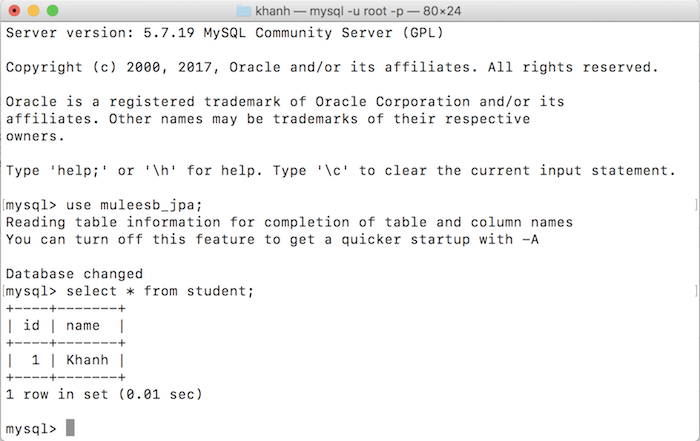
My database currently has the following data:
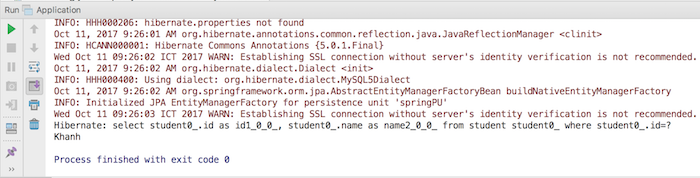
So the result would be: