Apache Kafka from version 4.x onwards only supports KRaft mode, but if you need to work with ZooKeeper mode, you can refer to this tutorial to install Apache Kafka with ZooKeeper mode! Installing Apache Kafka using Docker Compose will help us quickly start up an Apache Kafka server without much effort, just install Docker and a docker-compose.yml file.
I will create a new compose.yml file and declare 2 services, one for Apache ZooKeeper and one for Apache Kafka, as follows:
|
1 2 3 4 |
services: zookeeper: kafka: |
We will use the Apache Kafka and Apache Zookeeper Docker images from the Confluent Platform https://www.confluent.io/ with the Docker Hub address https://hub.docker.com/u/confluentinc. In a nutshell, Confluent Platform is an extension of Apache Kafka, built from Apache Kafka along with other useful tools and services that make it easy for us to run and use Apache Kafka! There is no Docker Official Image from Apache Kafka for 3.x version so we can use Docker Images from this Confluent Platform.
The content of the zookeeper service is as follows:
|
1 2 3 4 5 6 7 8 |
zookeeper: image: confluentinc/cp-zookeeper:7.9.7 environment: ZOOKEEPER_CLIENT_PORT: 2181 volumes: - ./zoo_data:/data ports: - 2181:2181 |
ZOOKEEPER_CLIENT_PORT is a required environment variable to define the port that clients can connect to Apache Zookeeper. In our case, it’s Apache Kafka! Here, I also expose port 2181 which is the default port of Apache Zookeeper.
And the kafka service has the following content:
|
1 2 3 4 5 6 7 8 9 10 11 12 13 |
kafka: image: confluentinc/cp-kafka:7.9.7 depends_on: - zookeeper environment: KAFKA_ZOOKEEPER_CONNECT: zookeeper:2181 KAFKA_ADVERTISED_LISTENERS: PLAINTEXT://kafka:29092,PLAINTEXT_HOST://localhost:9092 KAFKA_LISTENER_SECURITY_PROTOCOL_MAP: PLAINTEXT:PLAINTEXT,PLAINTEXT_HOST:PLAINTEXT KAFKA_OFFSETS_TOPIC_REPLICATION_FACTOR: 1 volumes: - ./kafka_data:/var/lib/kafka/data ports: - 9092:9092 |
The KAFKA_ZOOKEEPER_CONNECT environment variable is used to define the Apache ZooKeeper server that Apache Kafka will connect to, and the variable KAFKA_ADVERTISED_LISTENERS here, I define 2 types of listeners:
- PLAINTEXT://kafka:29092 to expose the port of Apache Kafka for Docker Containers in the same network to connect to.
- PLAINTEXT_HOST://localhost:9092 is used to expose Apache Kafka outside the container so that clients can connect to it.
For each listener, you need to define the security protocol https://kafka.apache.org/38/javadoc/org/apache/kafka/common/security/auth/SecurityProtocol.html, using the KAFKA_LISTENER_SECURITY_PROTOCOL_MAP environment variable. In my example, I use PLAINTEXT for both listeners, which means no need to authenticate, no need to encrypt!
The KAFKA_OFFSETS_TOPIC_REPLICATION_FACTOR environment variable is set to 1 instead of the default value of 3 because I am running Apache Kafka on my personal machine, which is just a single-node cluster.
These are the required environment variables that you must declare when starting a Docker Container from cp-kafka Docker Image!
The entire content of the compose.yml file is as follows:
|
1 2 3 4 5 6 7 8 9 10 11 12 13 14 15 16 17 18 19 20 21 22 23 |
services: zookeeper: image: confluentinc/cp-zookeeper:7.9.7 environment: ZOOKEEPER_CLIENT_PORT: 2181 volumes: - ./zoo_data:/data ports: - 2181:2181 kafka: image: confluentinc/cp-kafka:7.9.7 depends_on: - zookeeper environment: KAFKA_ZOOKEEPER_CONNECT: zookeeper:2181 KAFKA_ADVERTISED_LISTENERS: PLAINTEXT://kafka:29092,PLAINTEXT_HOST://localhost:9092 KAFKA_LISTENER_SECURITY_PROTOCOL_MAP: PLAINTEXT:PLAINTEXT,PLAINTEXT_HOST:PLAINTEXT KAFKA_OFFSETS_TOPIC_REPLICATION_FACTOR: 1 volumes: - ./kafka_data:/var/lib/kafka/data ports: - 9092:9092 |
If you now run the command “docker compose up” in the directory containing this docker-compose.yml file, you will see the following results:
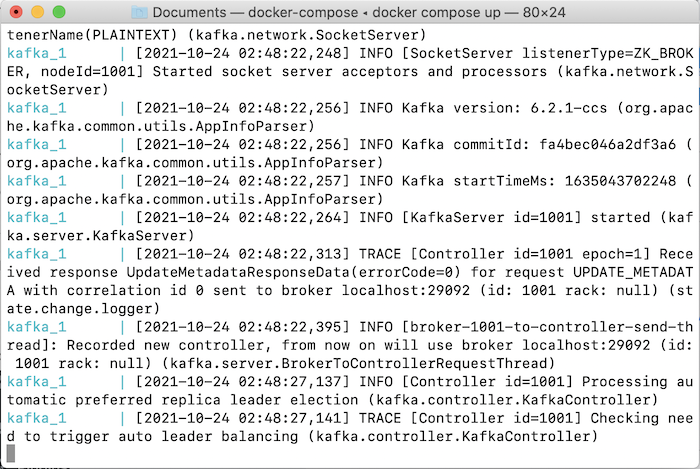
Now you can connect to this Apache Kafka server to use it.