

To illustrate the implementation of the Outbox Pattern with Debezium, let’s consider a system with two services: student-service and other-service:
- The student service will expose an API to add new student information to the database.
- This newly added student information needs to be communicated to the Other Service for further processing of additional logic.
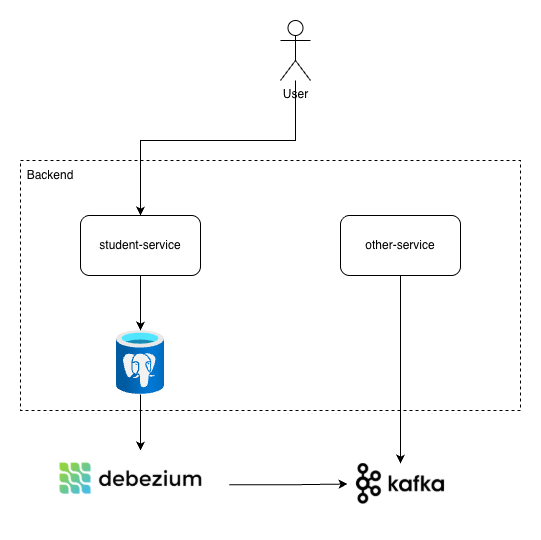
We will use the Outbox Pattern to ensure data consistency! The newly added student information will be captured by Debezium and published to the Other Service via Apache Kafka.
The high-level architecture of our system will be as follows:
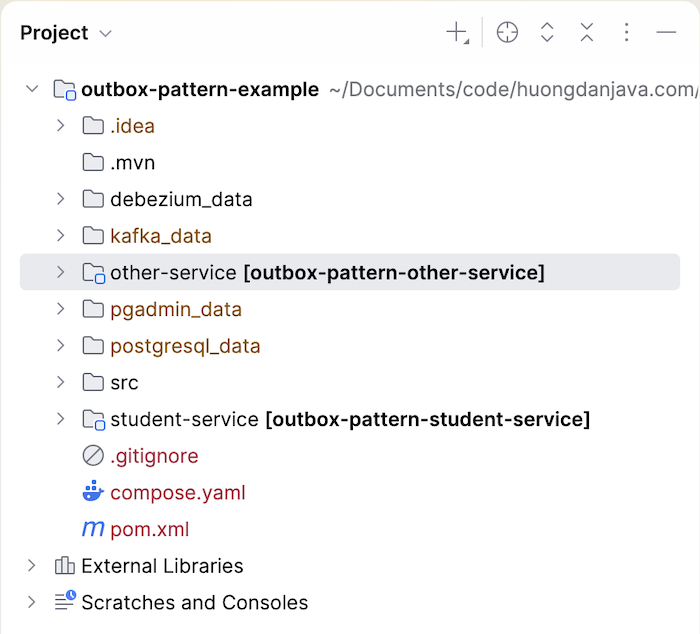
For example, I will create a new Maven multi-project with two projects, student-service and other-service, as follows:
Student Service
Student Service is a Spring Boot application that uses Web Starter, Data JPA Starter, PostgreSQL driver, Lombok, and Docker Compose Support.
For the PostgreSQL database server, we will use Spring Boot’s Docker Compose support to run a PostgreSQL database when the application starts. This PostgreSQL database will have its data capture configurations enabled by default. The content of the Docker Compose file will be as follows:
services:
|
1 2 3 4 5 6 7 8 9 10 11 12 13 14 15 16 17 |
postgres: image: 'postgres:18.4' volumes: - ./src/main/resources/db.sql:/docker-entrypoint-initdb.d/db.sql - ./postgresql_data:/var/lib/postgresql environment: - POSTGRES_DB=outbox_pattern_example - POSTGRES_PASSWORD=123456 - POSTGRES_USER=khanh command: - postgres - -c - wal_level=logical - -c - shared_preload_libraries=pgoutput ports: - '5430:5432' |
The compose.yaml file will be located in the root directory of your project.
In the db.sql file in the src/main/resources directory, the student table will be defined as follows:
|
1 2 3 4 |
CREATE TABLE student ( id UUID PRIMARY KEY, name VARCHAR(100) ); |
The entities of the Student class and its Repository class have the following contents:
|
1 2 3 4 5 6 7 8 9 10 11 12 13 14 15 16 17 18 |
package com.huongdanjava.systemdesign.outboxpattern.repository.entity; import jakarta.persistence.Entity; import jakarta.persistence.Id; import java.util.UUID; import lombok.Getter; import lombok.Setter; @Entity @Getter @Setter public class Student { @Id private UUID id; private String name; } |
and:
|
1 2 3 4 5 6 7 8 9 10 11 |
package com.huongdanjava.systemdesign.outboxpattern.repository; import com.huongdanjava.systemdesign.outboxpattern.repository.entity.Student; import java.util.UUID; import org.springframework.data.jpa.repository.JpaRepository; import org.springframework.stereotype.Repository; @Repository public interface StudentRepository extends JpaRepository<Student, UUID> { } |
Also in this db.sql file, I defined the contents of the outbox table as follows:
|
1 2 3 4 5 6 7 |
CREATE TABLE outbox ( id UUID PRIMARY KEY, aggregate_id UUID NOT NULL, type VARCHAR NOT NULL, event_type VARCHAR NOT NULL, payload VARCHAR NOT NULL ); |
-
- The
idcolumn is used as the unique ID for each message sent to Apache Kafka. aggregate_idis the ID of the domain object associated with the event. In my example, it’s the student ID.typeis the domain object model associated with the event; in my example, it’sstudent.event_typeis the type of event associated with the domain object model. The type can beadd,update,delete, etc.payloadis the JSON content of the event.
- The
I also added the entity and Repository class to this outbox table as follows:
|
1 2 3 4 5 6 7 8 9 10 11 12 13 14 15 16 17 18 19 20 |
package com.huongdanjava.systemdesign.outboxpattern.repository.entity; import jakarta.persistence.Entity; import jakarta.persistence.Id; import java.util.UUID; import lombok.Getter; import lombok.Setter; @Entity @Getter @Setter public class Outbox { @Id private UUID id; private UUID aggregateId; private String type; private String eventType; private String payload; } |
and:
|
1 2 3 4 5 6 7 8 9 10 11 |
package com.huongdanjava.systemdesign.outboxpattern.repository; import com.huongdanjava.systemdesign.outboxpattern.repository.entity.Student; import java.util.UUID; import org.springframework.data.jpa.repository.JpaRepository; import org.springframework.stereotype.Repository; @Repository public interface StudentRepository extends JpaRepository<Student, UUID> { } |
StudentController will expose the API for adding new students with the following content:
|
1 2 3 4 5 6 7 8 9 10 11 12 13 14 15 16 17 18 19 20 21 22 23 24 25 26 27 28 29 30 31 32 33 34 35 36 37 38 39 40 41 42 43 44 45 46 47 48 49 |
package com.huongdanjava.systemdesign.outboxpattern.controller; import com.huongdanjava.systemdesign.outboxpattern.controller.dto.AddNewStudentRequest; import com.huongdanjava.systemdesign.outboxpattern.controller.dto.AddNewStudentResponse; import com.huongdanjava.systemdesign.outboxpattern.repository.OutboxRepository; import com.huongdanjava.systemdesign.outboxpattern.repository.StudentRepository; import com.huongdanjava.systemdesign.outboxpattern.repository.entity.Outbox; import com.huongdanjava.systemdesign.outboxpattern.repository.entity.Student; import jakarta.transaction.Transactional; import java.util.UUID; import org.springframework.http.ResponseEntity; import org.springframework.web.bind.annotation.PostMapping; import org.springframework.web.bind.annotation.RequestBody; import org.springframework.web.bind.annotation.RestController; import tools.jackson.databind.ObjectMapper; @RestController public class StudentController { private final StudentRepository studentRepository; private final OutboxRepository outboxRepository; private final ObjectMapper om = new ObjectMapper(); public StudentController(StudentRepository studentRepository, OutboxRepository outboxRepository) { this.studentRepository = studentRepository; this.outboxRepository = outboxRepository; } @PostMapping("/students") @Transactional ResponseEntity<AddNewStudentResponse> addNewStudent(@RequestBody AddNewStudentRequest request) { Student student = new Student(); student.setName(request.getName()); student.setId(UUID.randomUUID()); Student s = studentRepository.save(student); Outbox outbox = new Outbox(); outbox.setId(UUID.randomUUID()); outbox.setAggregateId(s.getId()); outbox.setEventType("StudentCreated"); outbox.setType("Student"); outbox.setPayload(om.writeValueAsString(student)); outboxRepository.save(outbox); return ResponseEntity.ok(new AddNewStudentResponse(true, "Added new student")); } } |
Along with inserting a new record into the student table, we will also insert a record into the outbox table. This outbox table will be monitored by Debezium so that whenever a new record is added, Debezium will pick it up and send a message to Apache Kafka.
The contents of the AddNewStudentRequest and AddNewStudentResponse classes are as follows:
|
1 2 3 4 5 6 7 8 9 10 |
package com.huongdanjava.systemdesign.outboxpattern.controller.dto; import lombok.Data; @Data public class AddNewStudentRequest { private String name; } |
|
1 2 3 4 5 6 7 8 9 10 11 12 13 |
package com.huongdanjava.systemdesign.outboxpattern.controller.dto; import lombok.AllArgsConstructor; import lombok.Data; @Data @AllArgsConstructor public class AddNewStudentResponse { private boolean success; private String message; } |
Other Service
For the Other Service, I’ll also create a Spring Boot project using Spring Boot Starter Kafka.
The Other Service will subscribe to an Apache Kafka topic, the same topic where Debezium will publish the Student Service’s data changes! Then it will print the received data to the console. I’ll write the simple code as follows:
|
1 2 3 4 5 6 7 8 9 10 11 12 13 14 |
package com.huongdanjava.systemdesign.outboxpattern; import org.springframework.kafka.annotation.KafkaListener; import org.springframework.stereotype.Component; @Component public class AppListener { @KafkaListener(topics = "outboxpattern.public.outbox", groupId = "huongdanjava") public void listen(String message) { System.out.println("Received message: " + message); } } |
outboxpattern.public.outbox will be the name of the topic where Debezium publishes the message data change.
The application.yaml file for this service contains the following content:
|
1 2 3 4 5 6 7 |
spring: kafka: bootstrap-servers: localhost:9092 consumer: group-id: huongdanjava key-deserializer: org.apache.kafka.common.serialization.StringDeserializer value-deserializer: org.apache.kafka.common.serialization.StringDeserializer |
I will define a service to run Apache Kafka in the Docker Compose file above as follows:
|
1 2 3 4 5 6 7 8 9 10 11 12 13 14 15 16 17 18 19 20 21 |
kafka: image: confluentinc/cp-kafka:8.2.1 environment: KAFKA_NODE_ID: 1 KAFKA_PROCESS_ROLES: 'broker,controller' KAFKA_ADVERTISED_LISTENERS: PLAINTEXT://kafka:29092,PLAINTEXT_HOST://localhost:9092 KAFKA_LISTENER_SECURITY_PROTOCOL_MAP: CONTROLLER:PLAINTEXT,PLAINTEXT:PLAINTEXT,PLAINTEXT_HOST:PLAINTEXT KAFKA_OFFSETS_TOPIC_REPLICATION_FACTOR: 1 CLUSTER_ID: 'MkU3OEVBNTcwNTJENDM2Qk' KAFKA_CONTROLLER_QUORUM_VOTERS: '1@kafka:29093' KAFKA_LISTENERS: 'PLAINTEXT://kafka:29092,CONTROLLER://kafka:29093,PLAINTEXT_HOST://0.0.0.0:9092' KAFKA_INTER_BROKER_LISTENER_NAME: 'PLAINTEXT' KAFKA_CONTROLLER_LISTENER_NAMES: 'CONTROLLER' volumes: - ./kafka_data:/var/lib/kafka/data healthcheck: test: [ "CMD-SHELL", "kafka-topics --bootstrap-server localhost:9092 --list" ] interval: 5s retries: 10 ports: - 9092:9092 |
Debezium Server
For the Debezium Server, I will define a new service in the Docker Compose above to run it, as follows:
|
1 2 3 4 5 6 7 8 9 10 |
debezium-server: image: quay.io/debezium/server:3.5.2.Final depends_on: - postgres - kafka volumes: - ./debezium_data:/debezium/data - ./src/main/resources/conf:/debezium/config ports: - 8080:8080 |
The Debezium configuration file in the src/main/resource/conf directory of the project root will have the following content:
|
1 2 3 4 5 6 7 8 9 10 11 12 13 14 15 16 17 18 19 20 21 |
debezium.source.database.hostname=postgres debezium.source.database.port=5432 debezium.source.database.user=khanh debezium.source.database.password=123456 debezium.source.database.dbname=outbox_pattern_example debezium.source.connector.class=io.debezium.connector.postgresql.PostgresConnector debezium.source.topic.prefix=outboxpattern debezium.source.offset.storage.file.filename=data/offsets.dat debezium.source.offset.flush.interval.ms=0 debezium.source.schema.history.internal=io.debezium.storage.file.history.FileSchemaHistory debezium.source.schema.history.internal.file.filename=data/schema-history.dat debezium.source.plugin.name=pgoutput debezium.sink.type=kafka debezium.sink.kafka.producer.bootstrap.servers=kafka:29092 debezium.sink.kafka.producer.key.serializer=org.apache.kafka.common.serialization.StringSerializer debezium.sink.kafka.producer.value.serializer=org.apache.kafka.common.serialization.StringSerializer |
With the above configuration, a topic named outboxpattern.public.outbox will be created in Apache Kafka! All changes to the outbox table will be captured and published to this topic.
Please refer to the tutorial Change Data Capture with Debezium for a better understanding of this configuration!
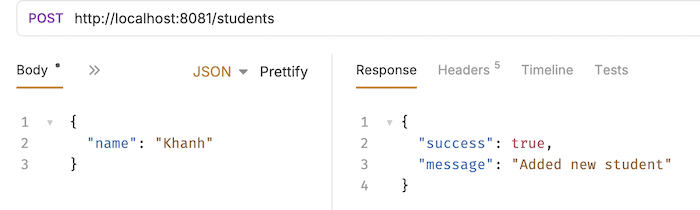
Now, if you run all system applications and then request the Student Service http://localhost:8081/students using the POST method, you will see the following result:
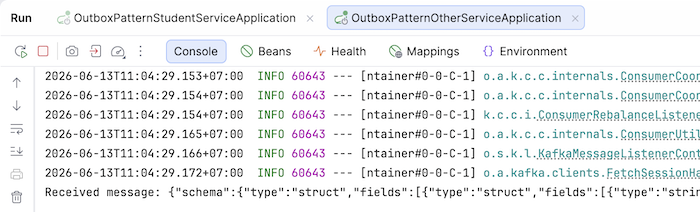
In the Other Service’s console log, you’ll see a received message, as follows:
In both the student table and the outbox table, you will also see a new record like this:
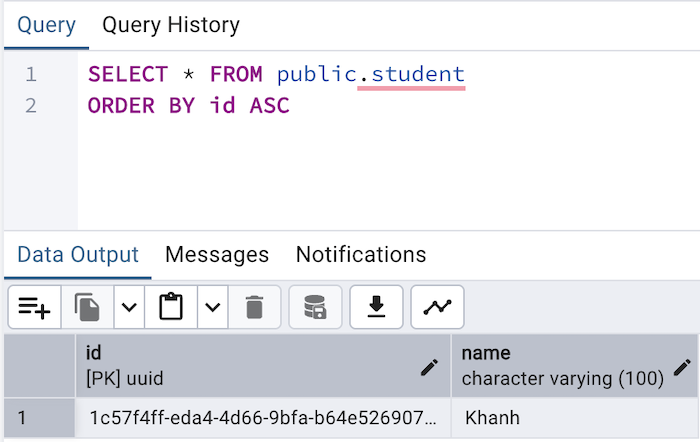
and:

So, we have successfully implemented the Outbox Pattern with Debezium!
You can watch the video here: